

What Is Bank Reconciliation?
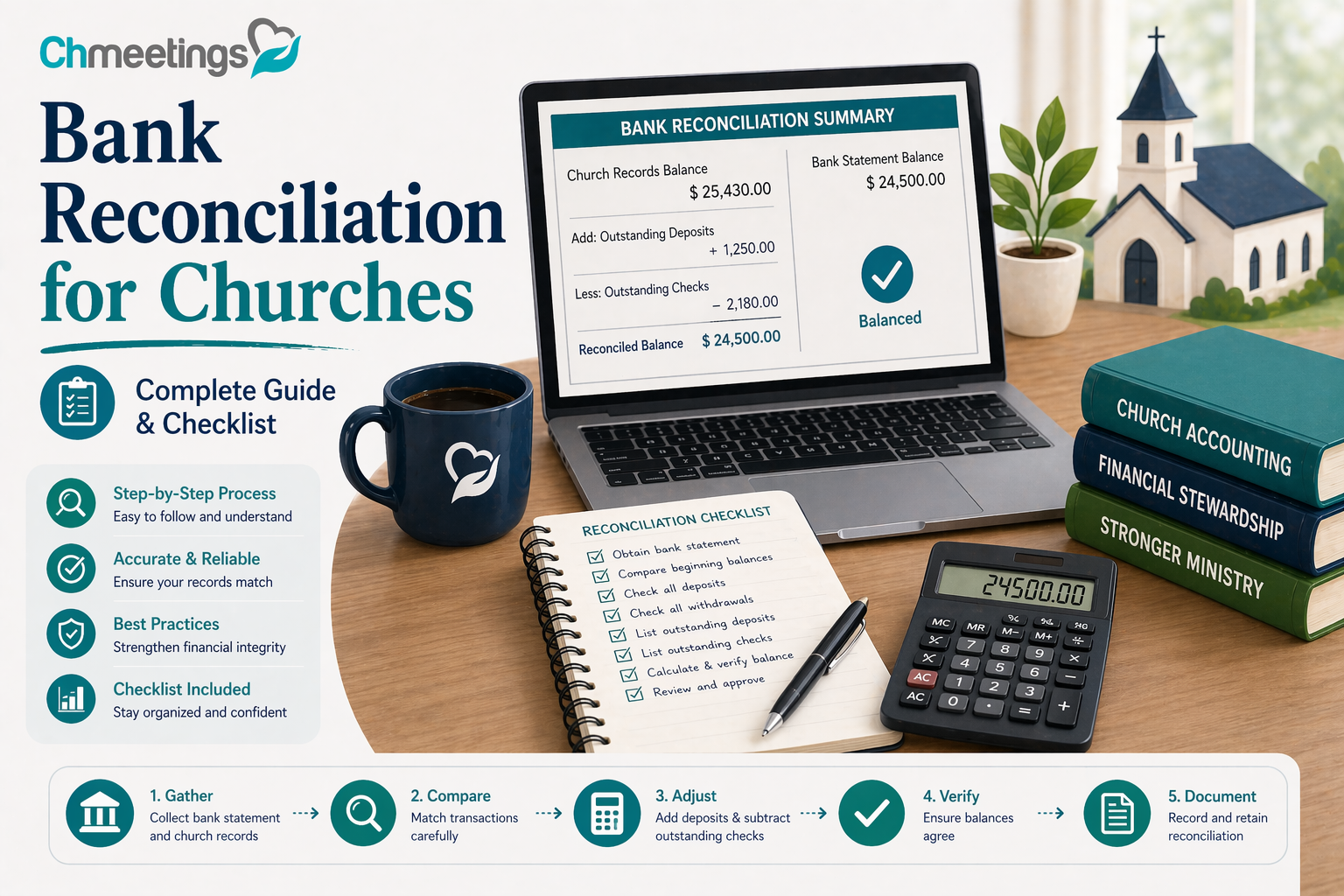
Bank reconciliation is the process of comparing your church’s financial records to the bank’s records, confirming that every deposit, withdrawal, fee, and transfer is recorded and understood. For churches, it’s not just bookkeeping, it’s the way you prove cash on hand matches what the church actually has available for ministry.
Define Reconciliation For Churches
Reconciliation means matching the church’s check register, giving records, petty cash logs, and general ledger to the bank statement for a given period. It confirms deposits were credited, checks cleared as written, bank fees are accounted for, and electronic gifts or processor transfers arrived intact. The goal is a clear, documented explanation for every difference between book balance and bank balance.
Match Church Records To Bank Statements
Start by pulling the bank statement and the church’s internal records for the same period, including giving reports, deposit slips, and the check register. Tick off each item on the statement against what’s in the ledger, note deposits in transit and outstanding checks, and identify merchant settlements and bank fees that need recording. Using a church management app to export giving reports and deposit batches speeds this work and reduces manual mismatch, especially when online donations land in the bank several days after they post in your giving system.
Distinguish Timing Differences From Errors
Timing differences are normal, they include deposits in transit, outstanding checks, and card processor delays, and they usually resolve in the next statement cycle. Errors are things that need correction, like a double entry, a missed deposit, a misposted amount, or a bank posting mistake. Document timing items separately, adjust your books for confirmed errors, and contact the bank right away for any suspected bank-side mistakes.
Why Reconcile Regularly
Reconciling on a regular schedule protects your ministry, keeps financial reports reliable, and preserves the trust donors place in your stewardship. When you reconcile, you’re managing risk and enabling clear decisions about ministry spending.
Protect Church Assets From Fraud
Frequent reconciliation makes it much harder for unauthorized transactions to go unnoticed. Missing deposits, unexplained transfers, forged checks, and repeated small withdrawals stand out when someone is looking at the bank statement weekly or monthly. Early detection reduces loss and gives you time to investigate and take corrective action.
Ensure Accurate Financial Reporting
Your budget forecasts, payroll, grant tracking, and board reports rely on accurate cash balances. Unreconciled accounts lead to wrong decisions, missed payments, and surprises at year end. Reconciled books mean your reports reflect the true financial position of the church, every month.
Maintain Donor Trust And Compliance
Donors expect their gifts to be recorded and used as intended. Reconciliation ensures restricted gifts are tracked, contribution statements are correct, and audits or regulatory reviews go smoothly. Prompt, accurate donor statements reinforce confidence and help you stay compliant with reporting obligations.
Assign Reconciliation Roles
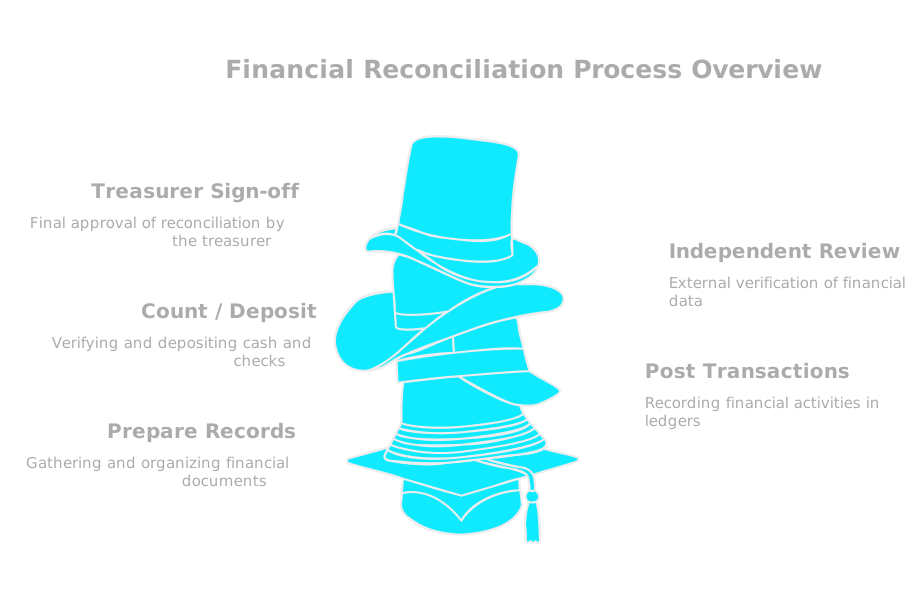
Clear roles and controls make reconciliation consistent and defensible. Define who prepares records, who reviews them, and who signs off, so no single person controls the whole cash-to-bank cycle.
Segregate Duties For Safeguarding
Separate data entry, deposit preparation, check signing, and reconciliation duties among multiple people whenever possible. Volunteers can help count and log deposits, staff can post transactions, and an independent reviewer should reconcile. This separation reduces opportunity for theft and catches mistakes faster.
Define Treasurer Versus Staff Tasks
Staff or a bookkeeper typically record transactions, prepare deposit summaries, and gather bank documents. The treasurer reviews reconciliations, investigates discrepancies, and provides final approval and signature. Pastors and ministry leaders should avoid handling cash or performing reconciliations to preserve checks and balances.
Establish Review And Approval Steps
Create a standard checklist: gather bank statement, print giving and deposit reports, mark outstanding items, adjust the ledger for confirmed errors, and produce a reconciliation worksheet. Have an independent reviewer sign off and file the reconciliation and supporting documents. Using a church management app for giving records and audit trails helps reviewers verify deposits and donor records without chasing paper, and it creates an easier audit trail.
Set Reconciliation Frequency

Choose reconciliation cadence based on transaction volume and risk. More activity means more frequent checks.
Weekly For High-Activity Accounts
Accounts that handle daily giving, merchant processor settlements, or payroll transfers need weekly attention. Weekly reconciling catches posting errors and missing deposits quickly, which matters when funds flow in and out often.
Monthly For General Operating Accounts
Monthly reconciliation is the standard for most operating accounts, matching the bank’s monthly statement cycle. Reconciling monthly aligns with budgeting, payroll runs, and board reporting. Aim to complete month-end reconciliations within the first week of the new month.
Quarterly For Low-Use Or Reserve Accounts
Reserve funds, investment accounts with minimal activity, or low-use savings can be reconciled quarterly, provided statements are reviewed and any fees or transfers are recorded promptly. Even for low-use accounts, perform an annual full review and confirm account balances with the institution.
Quick Reconciliation Playbook
10-Minute Checklist For Regular Runs
- Pull the latest bank statement and the church ledger or giving batch for the same period.
- Tick off each cleared check and deposit, mark outstanding checks, and note deposits in transit.
- Record bank fees and any interest shown on the statement.
- Flag any amounts that don’t match and attach a quick note for follow up.
- Sign or initial the worksheet and file the statement with backup documents.
Do this every week or month depending on volume, and you’ll catch problems before they balloon.
Prioritized Steps For Troubled Accounts
Start with the high-impact items. First, confirm deposits that fund payroll or bills, then verify recent large withdrawals. Next, isolate recurring discrepancies, like processor timing gaps or a specific check number that keeps reappearing. If a volunteer or staff member recorded entries, review their source documents and compare them to bank timestamps. Keep a running log of patterns so you can fix root causes, not just symptoms.
When To Escalate To Leadership
Escalate when you find unexplained large withdrawals, repeated missing deposits, forged signatures, or any suspected fraud. Also involve leadership if reconciliations show a consistent negative balance or if corrections exceed an agreed material threshold. Present a concise packet: the bank statement, reconciliation worksheet, and proposed corrective entries. Leaders need clear facts and recommended next steps, not raw data.
Step-By-Step Reconciliation Process

Gather Bank Statement And Records
Start by collecting the bank statement, the check register, deposit slips, giving batches, merchant processor reports, and any internal cash logs. Ensure the statement covers the exact period you’re reconciling. If you use a church management app, export the giving and deposit reports for the same dates to save time.
Compare Deposits And Giving Records
Match each bank deposit to the corresponding giving batch or donor report. Look for grouped deposits from online processors that consolidate multiple gifts, and match totals rather than expecting one-to-one gift lines. Note deposits in transit, where a batch appears in your ledger but not yet on the bank statement.
Verify Checks And Electronic Payments
Tick off cleared checks by number and amount against your check register. Investigate any checks that cleared for a different amount, and confirm electronic payments like ACH or vendor debits are authorized and recorded. Mark outstanding checks that haven’t cleared for follow-up.
Record Bank Fees And Interest
Identify monthly service charges, returned item fees, and interest income shown on the statement. Post those amounts to the ledger in the correct expense or income accounts. If a fee is unexpected, contact the bank before recording an adjustment to ensure it’s not a posting error.
Account For Transfers Between Accounts
Document internal transfers, like moving funds from checking to savings, and match them on both accounts’ statements. These transfers reduce one account and increase the other, so post mirror entries in your books. If a transfer is missing on one side, note the timing difference rather than treating it as an error.
Adjust The Book Balance With Entries
After matching everything, prepare journal entries for items the bank shows but your books don’t, like fees, interest, or NSF checks. Reverse or correct any misposted donations or miscoded transactions. Recompute the adjusted book balance and confirm it equals the adjusted bank balance before finalizing.
Sign Off And Store Supporting Docs
Have the preparer and an independent reviewer sign the reconciliation worksheet. Staple or digitally attach the bank statement, deposit slips, giving reports, check copies, and any correspondence explaining discrepancies. Store records according to your retention policy so audits and donor inquiries are painless.
Reconciling Donations And Giving

Match Online Giving To Deposits
Online gifts often arrive in lump-sum deposits after processor fees. Use batch reports from your giving platform to tie each bank deposit to the included gifts. If you use a church management tool, export batch details to speed matching and show donor-level allocation for restricted gifts.
Reconcile Cash Offerings And Counters
Have two counters sign the cash count sheet, then compare the total to the deposit slip and ledger posting. If loose cash is packaged with checks, verify the total deposit equals the combined amounts. Any discrepancies between counters and deposits require recounts and review of the deposit bag chain of custody.
Handle Pledges, Restricted Funds, And Grants
Record restricted gifts to the correct fund immediately, then verify deposits match those fund totals. For pledges, apply payments against pledge balances and update remaining pledge schedules. For grants, reconcile grant deposits to award schedules and track any donor or funder restrictions until spent.
Record Refunds, Reversals, And Chargebacks
Post refunds and chargebacks as negative income and note the original gift and donor if possible. For processor reversals, document the original transaction, the reversal reason, and any communication with the donor. If a chargeback is disputed, preserve all supporting documentation and follow the processor’s dispute timeline.
Handling Discrepancies And Exceptions
Investigate Missing Deposits
Trace the deposit chain, starting with the counters’ cash count, deposit bag, and the bank’s deposit date. Check merchant processor settlement reports for delayed transfers. If a deposit is missing, contact the bank first, then review internal handling to see where the breakdown occurred.
Resolve Duplicate Or Omitted Entries
When you find duplicate postings, locate the source: double data entry, a misread deposit slip, or a processor resending a batch. Remove or reverse the duplicate with a clear journal entry and note the reason. For omitted items, add the missing entry with source documentation and update donor or vendor balances.
Correct Bank Errors And Stale Checks
If the bank posts an incorrect amount or misapplies a deposit, gather proof and ask the bank to research and correct it. For stale dated checks older than your policy allows, decide whether to reissue, void, or write them off according to governance. Document any action taken and get approval if the amount is material.
Document Findings And Post Corrections
Keep a reconciliation log that explains every discrepancy, the investigative steps, and the corrective journal entries. Attach source documents and approvals to the reconciliation file. Good documentation shortens audits, strengthens trust, and helps you prevent the same issues next month.
Internal Controls And Fraud Prevention
Use Segregation Of Duties Templates
Segregation of duties keeps one person from controlling the whole cash cycle. Use a simple template that lists tasks, then assign names and alternates: deposit counting, posting donations, check preparation, check signing, reconciliation, and review. For very small teams where full segregation isn’t possible, pair duties with compensating controls, like mandatory dual counts, mandatory reviews by a board member, or monthly external review. Update the template when volunteers rotate and keep a signed copy on file.
Require Dual Signatures For Large Checks
Set a clear dollar threshold for dual signatures, for example any payment over a set percentage of your monthly budget or a fixed amount. Require one signature from the treasurer and one from an authorized leader, or allow an electronic approval workflow that logs both approvers. Record the reason for exceptions and keep copies of signed checks or electronic approval receipts with the reconciliation file.
Schedule Surprise Audits And Spot Checks
Spot checks catch problems faster than waiting for month end. Schedule random petty cash counts, surprise reviews of deposit slips, and ad hoc comparisons of recent bank activity to the ledger. Assign an independent reviewer, ideally a board finance member, and rotate who does the spot checks. Keep the tone constructive, document findings, and require corrective actions when you find weaknesses.
Maintain An Audit Trail For Reconciliations
Every reconciliation needs supporting proof: the bank statement, reconciliation worksheet, deposit slips, scanned check images, giving batch reports, and the journal entries posted. Store digital copies with tamper-evident timestamps or simple version histories so you can show who prepared and who approved each reconciliation. A complete audit trail shortens investigations and builds confidence with donors and auditors.
Reconcile Faster With Software
Use Bank Feeds And Auto-Matching
Connect bank feeds to pull transactions automatically into your accounting or church finance tool. Auto-matching cuts hand entry and highlights only the exceptions you need to investigate. Still, review matched items regularly to catch misapplied deposits or processor consolidations, and turn on notifications for unmatched large items.
Integrate Giving Platforms And ChMS
Link your giving platform to your church management app or accounting system so batch deposits, donor allocations, and fees flow straight into your ledger. When gifts, fees, and deposit totals arrive pre-matched, reconciliation time drops dramatically and restricted gifts stay accurately posted to the right funds. If you already use a church management software, configure deposit batch syncing and map fund codes before you run month end.
Use Duplicate Detection And Rules
Create matching rules for recurring payments, merchant fees, and payroll transfers so the software auto-categorizes them. Enable duplicate detection to flag transactions that appear twice from processor retries or accidental manual entries. Fine-tune tolerance levels for amounts and dates, so rules speed work without hiding true mismatches.
Export Reports For Treasurer And Board
Generate reconciliation reports, deposit summaries, and giving batch exports as PDFs or spreadsheets, then schedule them for automatic delivery to the treasurer and finance committee. Include a short cover note that calls out exceptions and outstanding items. Exported packets make board review faster and keep everyone looking at the same numbers.
Integrate Reconciliation Into Month End
Post Adjusting Journal Entries
Make adjusting entries for bank fees, interest, NSF items, and identified errors before you close the month. Require each entry to cite the bank statement line and attach supporting docs. Have the treasurer review and sign off on material adjustments so the closed month reflects the true cash position.
Close Fund Balances And Reporting
Reconcile each fund’s bank activity to its ledger balances, confirm restricted and designated funds match donor intent, and roll forward fund balances for reporting. Produce a simple fund statement that shows beginning balance, activity, and ending balance for leadership. Closing funds monthly keeps grantors, elders, and program leaders from getting surprised later.
Prepare Packets For Audits And Reviews
As part of month end, assemble a packet with the bank statement, reconciliation worksheet, deposit slips, giving batch details, and related journal entries. Label items clearly and store them in a central digital folder. When auditors or reviewers arrive, you’ll save time and look organized.
Retain Records And Backup Documentation
Keep reconciliations, statements, deposit slips, check images, and supporting records according to your retention policy, commonly at least seven years for most financial documents and longer for payroll or property records. Back up files to a secure cloud location and control access so only authorized volunteers and staff can view sensitive documents. A reliable backup means you won’t lose months of work if a laptop fails.
Templates, Samples, And Formats
Bank Reconciliation Template And Example
Use a standard worksheet that shows beginning book balance, add deposits in transit, subtract outstanding checks, list bank adjustments, and compute adjusted balances. Include columns for item description, amount, source document, and status. Fill one example reconciliation each month and save it as a template for volunteers to follow.
Sample Reconciliation Statement Format
Produce a one-page reconciliation statement for leadership that summarizes beginning balance, total cleared per bank, adjustments posted, outstanding items, and final reconciled balance. Add a brief notes section for exceptions and the preparer and approver signatures. Keep this concise, it’s the snapshot leaders want.
Standard Journal Entry Templates
Create journal entry templates for common reconciliation adjustments, like bank fees, interest, NSF checks, and deposited-but-not-posted batches. Each template should include date, accounts affected, debit and credit amounts, explanation, supporting doc reference, and approval line. Templates reduce posting errors and speed training for new volunteers.
Printable Reconciliation Checklist
Offer a short checklist volunteers can print: gather statement, export giving batch, tick off deposits, mark outstanding checks, post adjustments, run reconciliation report, sign, and file. A printed checklist helps maintain consistency month to month and ensures nothing important gets skipped.
Common Mistakes To Avoid
Ignoring Restricted Fund Treatment
Restricted gifts must live in the right fund from the moment they arrive. Misposting a designated gift to general operations hides true program balances, creates awkward conversations with ministry leaders, and can damage donor trust. Always tag gifts with fund codes, reconcile restricted fund balances separately, and show program leaders a simple fund activity report each month so restrictions are visible and respected.
Mixing Personal And Church Transactions
Using a church account for personal spending is a fast track to governance trouble and possible legal exposure. It blurs records, masks true cash availability, and undermines segregation of duties. Keep personal accounts separate, require preapproval and reimbursement policies for expense advances, and build a habit of flagging any off-purpose transaction immediately for review and correction.
Relying Only On Auto-Matching
Auto-matching saves time, but it doesn’t replace judgment. Processors often group multiple gifts into one deposit, vendors occasionally post duplicate debits, and rules can miscategorize unusual items. Use matching rules to cut work, but review large or unmatched items each cycle. If you use a church management app, configure batch mapping and review auto-matches before you sign off, so software speeds reconciliation without hiding exceptions.
Waiting Too Long To Reconcile
Delays let small problems become big ones. The longer you wait, the harder it gets to trace a missing deposit, spot fraud, or correct a posting error. Set a clear cadence, calendarize reconciliations, and assign backups so the task isn’t stalled by one absent volunteer. Faster cycles mean fewer outstanding items and clearer, more reliable month-end reports.
Key Metrics To Track
Days To Reconcile Each Account
Measure the average number of days from the statement date to completed reconciliation for each account. Shorter times mean quicker detection of errors and fraud. Aim for weekly accounts to be reconciled within 3 to 7 days, and monthly accounts closed within the first week of the new month. Track this metric by account so you can spot chronic delays.
Number Of Outstanding Items
Count outstanding checks and deposits on every reconciliation, and track their total dollar value and age. Break them into buckets, for example 0 to 30 days, 31 to 60, and over 60. A rising number or growing age of outstanding items points to process breakdowns, stale checks, or follow-up gaps that need policy or staffing fixes.
Frequency Of Adjusting Entries
Track how many adjusting journal entries you post from reconciliations and the most common reasons. High frequency, or repeated adjusting entries for the same issue, signals systemic posting problems, training needs, or integration gaps. Use this metric to drive root-cause fixes, not just more corrections.
Trends In Deposits And Voids
Watch deposit volumes and voids over time, and compare them to attendance, campaigns, and event schedules. Sudden spikes in voids or an unexpected drop in deposit totals demand quick investigation. Export deposit trend reports from your giving platform or church management software to spot seasonality, processor delays, or counting issues early.
FAQs
How Often Should A Church Reconcile Bank Accounts?
Reconcile based on activity. Weekly for accounts with frequent deposits, merchant settlements, or payroll. Monthly for most operating accounts, completed within the first week of the new month. Quarterly is acceptable for low-activity reserve accounts, but perform an annual full review regardless. Increase frequency immediately when you suspect errors or unusual activity.
Who Is Responsible For Church Bank Reconciliation?
Typically a staff member or bookkeeper prepares the reconciliation and the treasurer or an independent reviewer signs off. Separate duties so one person doesn’t post, cut checks, and reconcile. For very small churches, use compensating controls like dual counters, rotating reviewers, and documented approvals to keep oversight strong.
What Should A Bank Reconciliation Template Include?
A good template shows beginning book balance and bank balance, deposits in transit, outstanding checks, bank adjustments, and the reconciled ending balance. Include columns for source document, date, amount, and status, plus lines for preparer and approver signatures and a notes field for exceptions. Reference the related journal entries so auditors can trace every adjustment.
How Do You Reconcile Online Giving Deposits?
Export the giving batch or settlement report from your processor, match the batch total to the bank deposit, and account for processor fees and timing differences. Allocate gifts to funds before posting and document any reversals or chargebacks. If you integrate your giving platform with a church management app, sync batch details to reduce manual matching, then still verify a sample of donor-level allocations.
What If The Bank Says There Is An Error?
Collect supporting docs, like deposit slips, scanned checks, and processor reports, then contact the bank immediately and request a formal research or correction. Document all conversations and expected timelines. Post provisional notes in your reconciliation but avoid permanent journal entries until the bank confirms the adjustment. Escalate to leadership if the item is material or suggests fraud.
Can Software Fully Automate Reconciliation?
Software can handle most of the heavy lifting, auto-matching bank feeds, grouping processor deposits, and flagging duplicates. But it can’t replace human review for restricted gifts, large exceptions, or disputed items. Use rules and integrations to cut time, then keep a review and sign-off step so leaders stay confident in the numbers. Church management software that syncs giving batches and provides clear audit trails will reduce effort, but not eliminate the need for oversight.





