
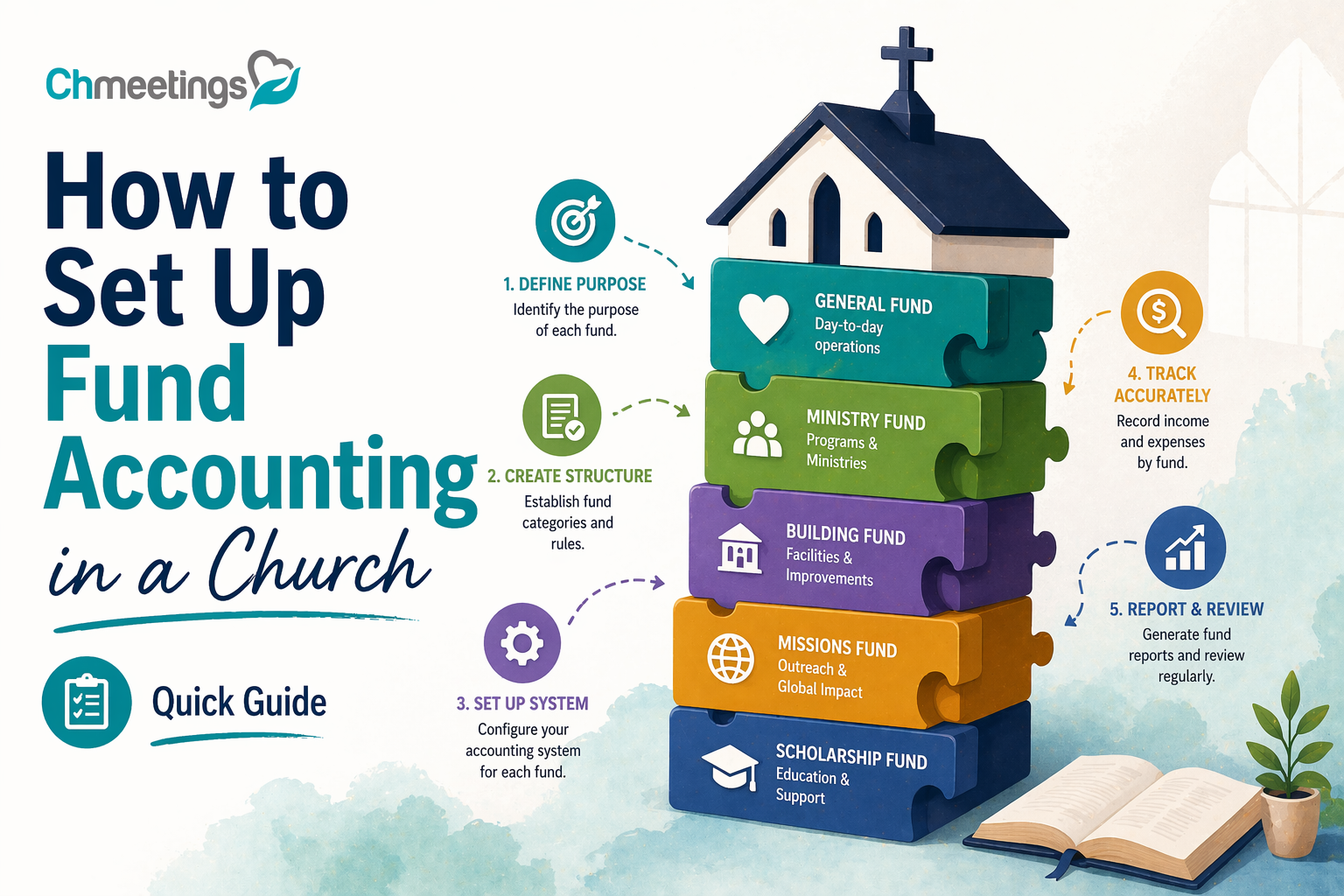

What Is Fund Accounting For Churches?
Fund accounting is a way of organizing finances so each pool of money is tracked according to donor restrictions and ministry purpose. Instead of measuring profit, you measure compliance with how gifts and grants must be used. That means income and expenses are recorded against specific funds, and the church reports fund balances so leaders and donors can see where money sits and how it’s spent.
How It Differs From Business Accounting
Business accounting focuses on net income and owner equity. Churches focus on stewardship, legal restrictions, and accountability to donors. Businesses aggregate revenue and expenses to show profit. Churches separate those same transactions into funds so a gift for a building project never looks like available operating cash. Financial statements emphasize fund balances and restricted versus unrestricted resources, not profit margins.
Key Terms Leaders Should Know
- Fund: a self-balancing set of accounts for a specific purpose.
- Restricted gift: donor-given money limited to a program or purpose.
- Unrestricted fund: resources usable at leadership’s discretion.
- Temporarily restricted: restriction expires based on time or purpose.
- Permanently restricted: principal must be preserved, income can be used.
- Fund balance: the net position of a fund at a point in time.
- Chart of accounts: the organized list of GL accounts mapped to funds and activities.
- Program or class: a way to tag activity by ministry area, useful for reporting.
When Fund Accounting Becomes Necessary
You don’t need dozens of funds on day one. Start when: the church receives gifts with specific restrictions, you run capital campaigns, you operate multiple ministries with separate budgets, you have multiple campuses, or donors and boards expect detailed reports. It’s also essential when grants or legal rules require separate reporting, or when you plan to scale ministry and need clearer stewardship.
Why Use Fund Accounting Now?
Fund accounting isn’t just bookkeeping. It protects donor intent, makes leadership decisions clearer, and positions the church to grow responsibly. Implementing it early avoids messy retrofits later.
Improve Stewardship And Transparency
Tracking funds by restriction lets you show exactly how gifts were used. That clarity reduces mistakes, prevents accidental use of restricted dollars, and makes internal and external reviews straightforward. Clear stewardship builds trust inside the church and with external stakeholders.
Strengthen Donor Confidence And Reporting
Donors want to know their gifts made an impact. Fund accounting lets you produce contribution statements and fund-level reports that show dollars received and program results. That’s vital for recurring giving, capital campaigns, and major donor relationships. Clean reporting reduces donor questions and increases long-term giving.
Support Budgeting And Ministry Decisions
When income and expenses are tied to funds and programs, leaders see the true cost of each ministry. That helps prioritize staff, discontinue underperforming programs, or redirect resources to growth areas. Fund-level variance reporting makes budget conversations concrete, not abstract.
Which Funds Should You Create?
Create funds that reflect legal restrictions, stewardship needs, and operational clarity. Aim for a balance: enough funds to be accurate, not so many that administration becomes the ministry.
General Operating And Restricted Funds
General operating is the foundational fund, for day-to-day ministries and salaries. Restricted funds cover donor-directed purposes, like youth ministry, worship tech, or a specific outreach. For each restricted fund, capture the donor’s intent, any expiration, and approval rules for spending.
Capital, Building, And Project Funds
Use capital funds for long-lived assets, building maintenance, or construction. Project funds work well for time-limited campaigns, like a sanctuary remodel. Keep capital gifts separate from operating cash so you don’t confuse long-term reserves with immediate expenses.
Missions, Benevolence, And Scholarship Funds
Missions funds track support for missionaries, partner ministries, and short-term trips. Benevolence funds are for direct assistance to people in need, usually with tighter controls and documentation. Scholarship funds support education expenses and may require specific approval workflows. Treat these funds as high-trust, high-accountability accounts.
When To Merge, Rename, Or Close Funds
Merge or close a fund when activity stops, the donor restriction expires, or remaining balances are tiny and immaterial. Rename funds when the purpose shifts, but document the change and notify stakeholders. Always follow board policy and donor intent rules, and move remaining balances through an approved process, not ad hoc decisions.
How To Design Your Chart Of Accounts
A well-designed chart of accounts makes fund accounting usable, not painful. Design around funds, programs, and locations, and keep the structure flexible for reporting.
Map Accounts To Funds, Programs, Locations
Treat fund, program, and location as dimensions you assign to each transaction. The GL records account types, while tags or classes record fund and program. That lets one expense be traced to a fund while still posting to the correct expense account. Use your church management app to capture gifts and tag them to funds at entry, so reconciliation becomes faster.
Numbering And Naming Best Practices
Use a simple, consistent numbering scheme: assets, liabilities, net assets, revenue, expenses. Reserve a segment of the number for fund or campus codes if your system requires a single field. Keep account names short and descriptive, like “4000 Contributions” or “5200 Worship Expenses.” Avoid spaces and special characters in codes, and document every code with a short purpose statement.
Sample Account Structures For Small And Multi Campus Churches
Small church example:
- 1000 Assets
- 2000 Liabilities
- 3000 Net Assets (fund-level balances)
- 4000 Revenue (4100 General Fund, 4200 Missions Fund)
- 5000 Expenses (5100 Staff, 5200 Worship, 5300 Children)
Multi-campus example with segments:
- 1-1000- Assets, where first digit is campus code (1 Main, 2 North)
- 2-3000- Net Assets, segmented by fund (3010 General, 3020 Building)
- 4-4100- Revenue, segment for program (4101 Giving-General, 4102 Giving-Missions)
This lets you run reports by campus, fund, or program without duplicating accounts. Use consistent tags and train staff on where to code donations and expenses so reports stay reliable.
How To Create Fund Policies And Rules
Clear fund policies turn good intentions into consistent practice. A short, written policy gives staff and volunteers the rules they need to steward gifts, respond to donors, and satisfy auditors.
Approvals For Creating Or Changing Funds
Define who can propose a new fund, who approves it, and who enacts it in your accounting system. Typical flow:
- Ministry leader requests a fund, provides purpose, expected lifespan, and funding sources.
- Finance committee or treasurer reviews alignment with mission and budget.
- Board or designated authority gives final approval for new permanent funds or policy-level changes.
Record approvals in meeting minutes and require a written fund description before the fund appears in your chart of accounts. Limit the number of people who can create or rename funds inside your accounting system, and use audit logs so changes are traceable.
Donation Restriction, Release, And Use Policies
Spell out how restricted gifts are accepted, tracked, and released for spending. Key rules to include:
- What counts as restricted, temporarily restricted, or unrestricted.
- Documentation required at receipt, like campaign language or donor letters.
- Conditions for releasing restrictions, including who authorizes releases and what paperwork is required.
- Spending hierarchy when funds overlap, for example donor restriction then board direction then general operating.
Add examples for common cases, such as capital gifts, scholarship funds, and benevolence. Make release approvals time stamped and tied to an invoice, check request, or expense report so auditors can follow the money.
Documentation Retention And Access Rules
Define what documents to keep, where, and who can access them. Minimum items to retain:
- Gift agreements, pledge forms, and donor restriction emails.
- Bank statements, reconciliations, cancelled checks, and deposit slips.
- Approval records for fund creation and releases, and board minutes.
Set retention periods that meet legal and donor needs, often 7 years for financial records and longer for capital campaign agreements. Use a centralized, backed-up repository and control access by role, not by person. If your church uses cloud church management software, link or store scanned documents there for quick retrieval and audit trails.
How To Choose Software For Fund Tracking
Picking the right tool makes fund accounting manageable instead of painful. Evaluate software on how it fits your size, staff skill, and reporting needs.
Must Have Features For Churches
Look for features that save time and reduce errors:
- Fund, class, and location tagging on transactions.
- Contribution entry with designation tracking and donor history.
- Automated recurring gift handling and pledge management.
- Bank feed reconciliation and multi-currency support if needed.
- Fund-level reporting, statement generation for donors, and exportable audit trails.
- Role-based permissions and an activity log so changes are accountable.
If you want smoother day-to-day work, prioritize features that reduce manual journal entries and duplicate data entry.
QuickBooks Versus Church Specific Tools
QuickBooks is flexible and widely used, but it’s a general ledger product, not built for church workflows. Pros and cons:
- QuickBooks pros: familiar interface, broad accountant support, strong general reporting.
- QuickBooks cons: no built-in giving portal, limited donor management, and fund tagging can get clumsy.
Church specific tools add giving, member records, pledge tracking, and donation statements in one place. They reduce manual imports and make donor communications easier. If you use QuickBooks, plan for an integrated giving solution or disciplined import routines. If you pick a church accounting product, make sure it handles your required audit and reporting standards.
Integrations With Giving Platforms And Bank Feeds
Integration reduces mistakes more than any policy will. Prioritize:
- Direct sync with your online giving provider so gifts arrive coded to funds automatically.
- Automatic bank feeds to speed reconciliation.
- Two-way connections with your church management app so contributions and member records stay synced.
Test integrations before going live and document fallback steps if a feed fails. A single source of truth for donor records prevents duplicate contributor profiles and mis-applied gifts.
Cost, Scalability, And Support Considerations
Total cost includes subscriptions, setup, training, and potential bookkeeping changes. Ask:
- Can the system scale to multiple campuses without extra bookkeeping complexity?
- What support levels are included, and is there a responsive help team for year-end or audit questions?
- Are there hidden fees for additional users, accounts, or integrations?
Small churches may prefer affordable, easy systems. Growing ministries should pick tools that scale into multi-site needs. If you want an all-in-one approach, consider a church management app that bundles giving, people management, and reporting, so data stays connected.
Step By Step Implementation Playbook

A disciplined rollout cuts errors and keeps ministry running. Break the project into planning, cleanup, setup, pilot, and launch.
Project Planning And Stakeholder Roles
Define scope, timeline, and accountability up front:
- Project sponsor, usually the senior pastor or board chair.
- Project lead, typically the treasurer or finance director.
- IT or system admin for software setup and integrations.
- Ministry contacts to map fund needs and approvals.
Create a simple project plan with milestones, owner for each task, and a communication schedule for staff and board updates.
Data Cleanup And Migration Checklist
Clean data makes the system usable from day one. Checklist items:
- Reconcile bank accounts and clear outstanding reconciling items.
- Clean contributor records, merge duplicates, confirm preferred giving methods.
- Map old fund names and codes to new fund structure, with an alias list for reference.
- Export historical giving and pledge data for import or archival.
- Verify fixed asset and depreciation schedules if capital funds are involved.
Document every mapping decision so auditors and future staff understand why balances moved.
Setting Up Bank Accounts, Classes, And Tags
Configure the system so reporting is straightforward:
- Create bank accounts that match your actual bank structure and signatory rules.
- Set up funds, classes, and location tags aligned to your chart of accounts.
- Limit and document who can create or change tags and accounts.
- Establish default tags for common transaction types to speed entry.
Test with a sample month of transactions to confirm reports show fund balances as expected.
Pilot Testing, Training, And Launch Steps
Run a small pilot before full rollout:
- Pilot with one campus, fund type, or ministry team for 4 to 6 weeks.
- Collect issues, adjust workflows, and tighten permissions.
Train everyone who enters or approves money, using real examples and a short cheat sheet. Set a soft launch date, run parallel records for one month if needed, then cut over. After launch, monitor reconciliations closely for the first three months and hold weekly check-ins with the finance team.
How To Record Donations And Expenses
Recording must reflect donor intent and keep fund balances accurate. Use consistent entry processes and clear approvals.
Posting Contributions And Designations
Capture donor intent at entry:
- Record each gift to the correct fund and program, including pledge payments and in-kind gifts.
- For split gifts, record line items showing amounts per fund.
- Attach or link donor restrictions to contribution records for audit trails.
Provide donors with clear receipts showing designations and year-to-date giving. Automate recurring gift postings where possible to reduce manual work.
Releasing Restricted Funds Correctly
Only release funds per documented restrictions and approvals:
- Match expense requests to the restriction language and fund purpose.
- Require an approval signature or recorded board action before spending restricted capital or scholarship funds.
- Post the expense to the fund that owns the restriction, not to general operating, unless a documented release moves the balance first.
Keep a release log with dates, approver names, and supporting invoices so auditors can follow the release.
Tracking Payroll, Grants, And Vendor Expenses
These items often cross funds and need careful coding:
- Allocate payroll by position or percentage to the funds that fund the salary, and document allocation methodology.
- Record grant awards with the fund and attach grant terms, reporting deadlines, and restricted uses.
- Code vendor invoices to the correct fund and program. Use purchase orders or expense requests to enforce approvals before payments are made.
Regularly review allocations for reasonableness, and adjust when ministry staffing or funding mixes change.
Journal Entries For Fund Transfers And Corrections
Use journal entries sparingly and document every transfer:
- Move balances between funds only with documented authority and a reason, like expired restrictions or approved reallocations.
- Record internal transfers with supporting memos that reference board minutes or donor permission.
- When correcting misposted gifts, create reversing entries plus the corrected entry, and retain a reconciliation worksheet showing the correction.
Keep journal entries reviewable by someone other than the preparer, and include an audit trail that ties entries to original deposits or invoices.
How To Reconcile And Close Monthly
Bank Reconciliation Best Practices
Reconcile every bank and merchant account monthly, not quarterly. Small timing differences hide real problems if you wait. Start by pulling the bank statement, then match deposits and cleared checks to your ledger. Use bank feeds in your bank or church management software, for example ChMeetings, to speed matching and reduce manual entry errors.
Key steps:
- Clear outstanding checks and identify stale items older than 90 days for review.
- Match deposit details to contribution records, including split gifts and fund designations.
- Flag and investigate any unexplained bank fees, returned items, or large reconciling items immediately.
Always have a second person review reconciliations, and save the signed reconciliation worksheet and supporting bank statement in your financial folder.
Reconciling Fund Balances And Undeposited Gifts
Fund accounting depends on accurate fund balances, so reconcile fund subaccounts to the general ledger monthly. Undeposited gifts are a common source of imbalance, especially when online giving posts separately from batch deposits. Reconcile the following items:
- Undeposited gift batches versus bank deposits, ensuring each batch maps to one or more bank deposits.
- Pledge receivables and restricted gift liabilities, confirming that received amounts reduce receivable balances correctly.
- Interfund transfers and journal entries, verifying each transfer has authorization and a supporting memo.
If a donor payment was misposted to the wrong fund, correct it with an adjusting entry and a brief explanation attached to the original contribution record.
Month End Close Checklist For Small Churches

A short, repeatable checklist makes month end reliable even with limited staff:
- Post all bank and merchant transactions, including payroll, before closing the month.
- Reconcile each bank account and clear undeposited items.
- Run fund balance reports and compare to prior month for material variances.
- Review major expense categories and investigate variances above your tolerance threshold.
- Approve and post any journal entries, with documentation and reviewer initials.
- Lock the period in your accounting system or note the close date in your records.
Keep the checklist under version control and store month-end files centrally so volunteers and new staff can follow the same process.
What Reports Should You Run Regularly?
Statement Of Financial Position By Fund
This is your fund-level balance sheet. Run it monthly and use it to confirm cash, liabilities, and net asset balances for each fund. Focus on:
- Cash by fund, make sure restricted cash equals donor-restricted fund balances.
- Short-term liabilities like payroll taxes or unspent pledges.
- Net asset classification, clearly separating unrestricted, temporarily restricted, and permanently restricted amounts.
Leaders should be able to see whether funds labeled as usable really are liquid and available for the stated purpose.
Statement Of Activities And Budget Versus Actual
Provide program-level income and expenses next to budget so leaders can make decisions with context. Run these reports monthly and include year-to-date columns. Important details:
- Show revenue and expense lines per fund or program, not just consolidated totals.
- Include budget variance percentages and a short narrative for any variance above your policy threshold.
- Use these reports for finance committee review and monthly leadership meetings to keep spending aligned with mission priorities.
Donor Giving, Pledge, And Fund Reports
Donor-focused reports build trust and support stewardship:
- Donor giving reports list gifts by fund and date, useful for resolving donor questions and preparing year-end statements.
- Pledge reports track commitments, payments to date, and outstanding balances, helping manage campaign forecasts.
- Fund activity reports show receipts and disbursements for each fund, ideal for donor updates and campaign transparency.
Automate contribution statements where possible to save time and reduce errors.
Reports For Leadership, Congregation, And Auditors
Different audiences need different detail levels:
- Leadership needs dashboards with budget vs actual, cash flow, and fund balances to make operational decisions.
- The congregation benefits from concise summaries, like a quarterly fund snapshot and plain-language explanations of major campaigns.
- Auditors require detailed transaction support, reconciliations, and an audit trail for donations, approvals, and journal entries.
Prepare tailored packages: a one-page summary for the congregation, a detailed packet for the board, and full supporting schedules for auditors.
How To Build Controls And Prepare For Audit
Segregation Of Duties And Approval Workflows
Design workflows so no one person controls an entire transaction from start to finish. For small teams, use compensating controls like rotating duties and documented approvals. Key separations:
- Someone records transactions, another reconciles bank accounts, and a third reviews and approves payroll and large disbursements.
- Require dual signatures or electronic approvals for checks or transfers over a threshold set by policy.
- Use role-based permissions in your accounting or church management app so volunteers only see what they need.
Receipt, Deposit, And Expense Documentation Standards
Standardize what must be attached to every financial transaction, then enforce it:
- Contributions, whether cash or check, need a deposit slip, donor ID, and fund designation.
- Online gifts should include transaction receipts and donor profiles linking the gift to the correct fund.
- Expense claims require an original receipt, cost code, purpose, and approver name.
Keep scanned documents linked to transactions in a central repository and set a retention schedule that meets policy and legal needs.
How To Prepare For An Audit Or Financial Review
Preparation reduces audit time and stress. Before auditors arrive:
- Reconcile all bank accounts and prepare bank reconciliation worksheets with explanations for old reconciling items.
- Gather gift agreements, pledge schedules, fund creation approvals, board minutes, and authorization logs.
- Provide a fund listing with descriptions and any donor restriction language.
- Produce a reconciliation between contribution reports and deposits, showing how online giving, undeposited batches, and bank deposits tie together.
Create a short audit packet that answers common auditor questions up front, and assign one point person to coordinate document requests and follow-ups.
Templates, Checklists, And Sample Files
Fund Accounting Excel Template Example
A simple Excel template should capture donor, date, deposit batch, fund code, amount, designation, and gift type on each row. Include columns for fund code, GL account, and a memo so every gift maps to your chart of accounts. Use a pivot table or SUMIFS formulas to roll up receipts by fund and period. Add a reconciliation sheet that compares undeposited batches to bank deposits, and lock formulas so volunteers can enter only in designated cells. Keep one tab for instructions and another for mappings from old fund names to new codes.
Chart Of Accounts PDF Sample
A PDF sample chart of accounts lists account numbers, names, and a one-line purpose for each account and fund. Include segments for campus or program if you use them, and show examples of typical revenue and expense postings. Provide crosswalks from legacy account names so reviewers can see how prior balances moved. Make the PDF printable, indexed by account type, and include a short governance note on who can change account names.
Month End Close And Fund Setup Checklist
Fund setup checklist:
- Document fund purpose, restriction language, and approval authority.
- Assign a fund code and map to net asset classification.
- Create initial opening balance journal with source documentation.
Month end close checklist:
- Post all bank and merchant transactions for the period.
- Reconcile bank accounts and undeposited gift batches.
- Run fund balance report and compare to prior month, investigate material variances.
- Approve and document any journal entries or releases of restriction.
- Archive signed reconciliations and attach supporting documents to the close folder.
Keep both checklists in a shared folder so volunteers and future staff follow the same process.
Sample Fund Policy And Gift Release Form
A short fund policy should state fund purpose, who may authorize expenditures, and how restrictions are released. Include required documentation for accepting restricted gifts and the retention timeline for agreements. The gift release form is a one-page approval that lists donor restriction text, fund code, amount to be released, authorization signature, date, and supporting invoice reference. Store signed forms with the contribution record so auditors can trace the release from donor intent to expense.
Common Mistakes To Avoid
Mixing Restricted And Unrestricted Funds
Recording restricted gifts into general operating creates compliance problems and donor distrust. It’s easy to do by mistake when deposits or entries aren’t coded correctly. Prevent it by requiring fund coding at gift entry, training counters, and reconciling fund-level cash monthly.
Creating Too Many Funds
Too many funds makes reporting and maintenance painful, and increases errors. Every new fund should have a written purpose and an owner. Merge or close funds that are inactive or immaterial, and document the rationale so history stays clear.
Weak Internal Controls And Poor Documentation
Letting one person handle recording, deposits, and reconciliation invites mistakes and fraud. Require separate duties where possible, attach source documents to every transaction, and keep an approval log for fund creation and releases. Even small churches can use simple compensating controls like periodic peer reviews and rotation of duties.
Key Metrics To Track
Fund Balances And Liquidity Ratios
Track cash by fund and compare restricted balances to liquid assets. A basic liquidity check is monthly cash on hand for operating funds, for example weeks of operating reserves. Watch that capital or scholarship funds aren’t inadvertently used for daily operations.
Budget Variance And Program Spend Rates
Compare actual spend to budget at the fund or program level each month. Calculate spend rate as actual expenses divided by budgeted expenses to date, and flag funds exceeding expected burn or underspending materially. Use variance narratives for anything outside your tolerance.
Giving Trends And Donor Retention
Monitor giving by fund, by donor cohort, and recurring gift retention rates. Monthly trends show whether a campaign is gaining traction and donor retention tells you if stewardship communications are working. Use simple rolling 12 month reports and cohort analyses to spot shifts early.
FAQs
How Do I Set Up Fund Accounting In A Church Template?
Start with a simple template that lists funds, fund codes, GL mappings, and opening balances. For each gift entry include donor, date, amount, fund code, and memo. Build summary sheets that roll up receipts and generate fund balance reports. Test with a prior month of data to confirm totals match your bank.
Where Can I Download A Fund Accounting PDF?
Look to denominational finance offices, state nonprofit associations, and church accounting resources from CPA firms for downloadable samples. Search terms like “church chart of accounts PDF” or “fund accounting template church” yield vetted options. Always review templates with your treasurer or accountant before use.
How Do I Set Up Fund Accounting In A Church In California?
The fund accounting setup is the same anywhere, but check California requirements for charitable solicitation and nonprofit reporting. Confirm any state registrations, keep donation records for audits, and consult a CPA familiar with California nonprofit practice to handle filings or local compliance questions.
Can A Small Church Use Simple Fund Accounting?
Yes. Small churches can track a few core funds in a spreadsheet or basic accounting package, focusing on general operating, building/capital, missions, and benevolence. Keep policies simple, reconcile monthly, and scale complexity only as needed.
How Many Funds Should A Church Have?
There’s no magic number. Start with essential funds: general operating, designated mission, building/capital, benevolence, and any active campaigns. Add funds only when donor restrictions or reporting needs demand them. Most small to mid sized churches operate well with five to a dozen funds.
How Do I Track Restricted Donations In Excel?
Give each restricted fund a unique code and include it on every gift row. Use SUMIFS to summarize receipts by fund and month. Maintain a separate sheet that lists donor restriction language and links to the gift row. Reconcile gift summaries to bank deposits and keep scanned gift agreements attached in a central folder.
Do Churches Need Professional Bookkeeping Training?
Basic bookkeeping training is essential for accuracy and controls. Volunteers can handle day to day entry with good processes, but you should have access to a professional for tax filings, audit preparation, and complex fund or grant issues. Train staff on your charts, policies, and month end routine.
What Is The 80% Rule For Churches?
There’s no universal 80% rule that applies to all churches. Some grantmakers or internal policies use an 80% guideline for program spending versus administrative costs, but it’s not a legal standard. Your focus should be clear donor compliance, reasonable administrative allocation, and transparent reporting rather than aiming for a single percentage.





