
What Are Restricted Funds?
What Counts As Donor Restrictions?
Donor restrictions are explicit limits the donor places on how their gift may be used. Common forms are:
- Purpose restrictions, for example, gifts “for the building fund,” “for missions,” or “for youth ministry.”
- Time restrictions, such as multi-year pledges or gifts that must be used after a certain date.
- Condition-based restrictions, where funds are released only after a milestone is met, like completion of a project. A restriction can be written or verbal, but written instructions are far easier to document and defend. If a donor’s intent is ambiguous, clarify in writing before you record it as restricted.
How Do Board Designations Differ?
Board designations look like restrictions but are not the same. When a board designates money for a future purpose, the designation is an internal decision. Key differences:
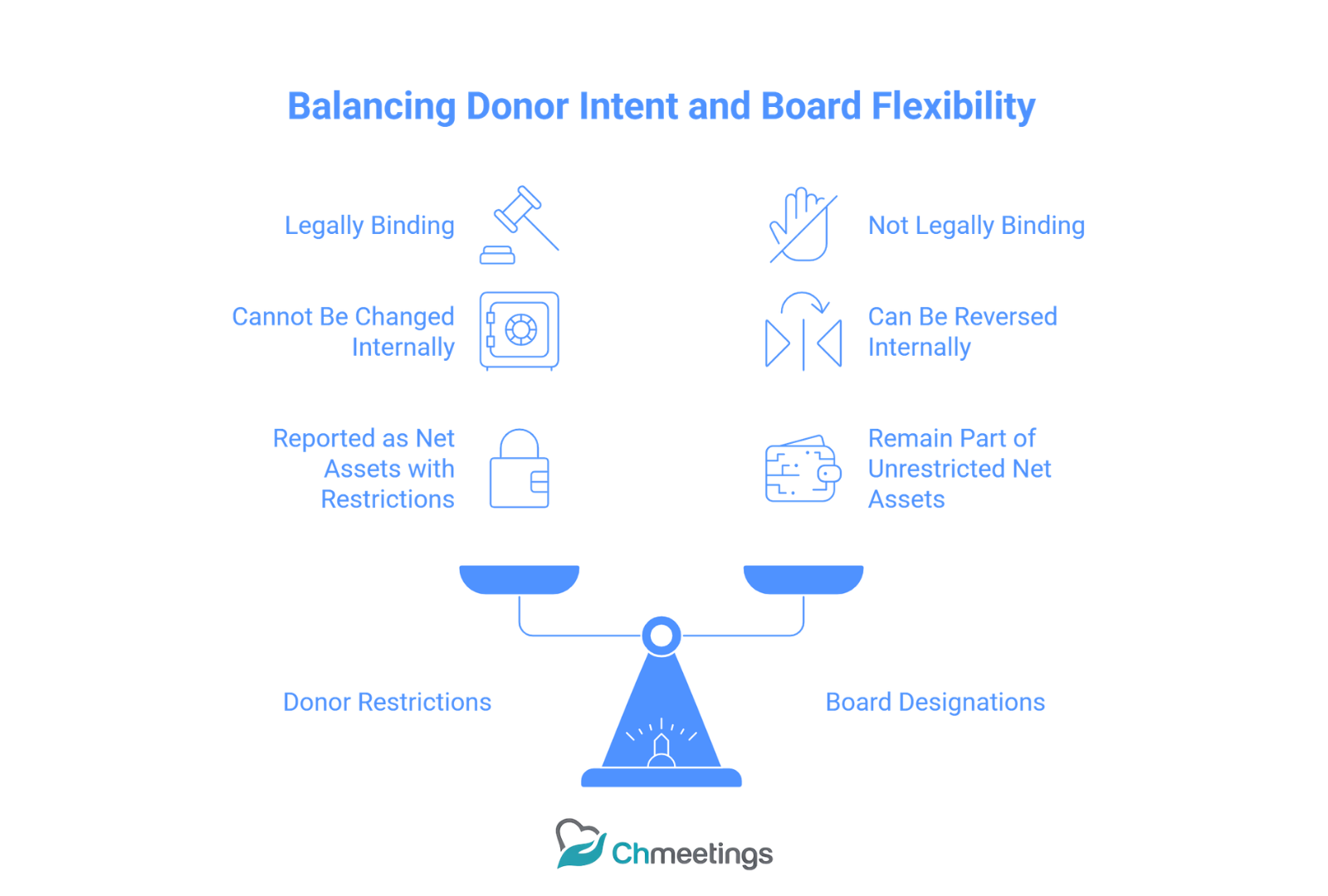
- Donor restrictions are legally binding on the church, board designations are not.
- The board can reverse a designation; a donor restriction can only be changed by the donor or a court in exceptional circumstances.
- For accounting, donor-restricted funds are reported as net assets with donor restrictions, while board-designated reserves remain part of unrestricted net assets. Treat designated reserves as part of responsible stewardship, but document board actions in minutes so auditors and donors understand the difference.
Examples For Churches
- Building fund given by members with notes saying “for sanctuary expansion” is donor restricted until the project is complete.
- A memorial gift labeled “for youth scholarships” is donor restricted to scholarships.
- The finance committee sets aside an operating reserve for cash flow, that’s a board designation and stays unrestricted for reporting purposes.
- A grant from a foundation for an after-school program with a required budget and reporting is donor restricted and may carry additional compliance obligations.
If you’re building your financial foundation from scratch, the Church Accounting Guide walks through everything you need to know before diving into restricted funds.
And if you’re looking for the bigger picture beyond finances, the Ultimate Church Management Guide covers every aspect of running a healthy, organized church.
How Do Unrestricted Funds Work?
What Belongs In The General Fund?
The general fund holds donations and income that come with no donor-imposed purpose. Typical items are:
- Regular tithes and offerings where donors give no specific direction.
- Unrestricted plate offerings and event income.
- Any donor gifts explicitly marked “for general use” or “where needed most.” This fund supports core operations, payroll, utilities, program costs, and discretionary benevolence.
When Do Gifts Become Restricted?
A gift becomes restricted when the donor specifies a purpose, time, or condition at the time of giving. Important practical points:
- If a donor writes a designation on an envelope or online memo, treat it as restricted until clarified.
- If the church accepts a gift under conditions, those conditions must be met before moving money to general operating.
- If a donor’s restriction is fulfilled, the restriction is considered released and the funds become available to the church for their intended purpose. Document the original intent and the release, so your accounting and reporting line up.
Examples Of Unrestricted Uses
- Paying staff salaries, utilities, and routine building maintenance.
- Program supplies for weekly ministries when donors have not specified a purpose.
- Emergency assistance when the church decides, through its benevolence process, how to distribute help.
- Small-scale outreach events that are funded from general offerings. Unrestricted money is the flexible fuel of ministry; it pays the bills that keep ministry running.
What Are Tax And IRS Rules?
Are Restricted Donations Tax Deductible?
Yes, generally. Contributions to a qualified church remain deductible for donors whether restricted or unrestricted, provided the gift is a true charitable contribution and the donor receives no substantial goods or services in return. Things to remember:
- Donors need written acknowledgements for gifts of $250 or more to claim a deduction.
- If a donor receives goods or services in return, the fair market value of the benefit reduces the deductible amount.
- Noncash gifts have additional substantiation requirements depending on value.
What IRS Guidance Applies To Designations?
The IRS treats churches as public charities, and the rules for charitable contributions apply. Practical guidance for church leaders:
- Accepting a restriction creates a stewardship obligation; don’t promise what you can’t deliver.
- A board designation does not change donor deductibility because it is an internal decision.
- Be mindful of quid-pro-quo contributions, and issue appropriate receipts when donors receive benefits. If you have complex gifts or large restricted endowments, get professional tax or legal advice to ensure compliance.
Recordkeeping Required For Tax Compliance
Good records protect donors and the church. Required and recommended items:
- Written acknowledgements for contributions of $250 or more, showing amount, date, and statement about goods or services provided.
- Copies of donor restrictions, pledge agreements, and any correspondence clarifying intent.
- Separate records for noncash gifts, appraisals when required, and Form 8283 filing guidance for donors when applicable.
- Clear accounting entries showing when restrictions are met and funds are released. Keep records for several years and make them available for audits, donor requests, and internal review.
How To Set Up Accounts And Codes
How To Structure A Fund Chart Of Accounts
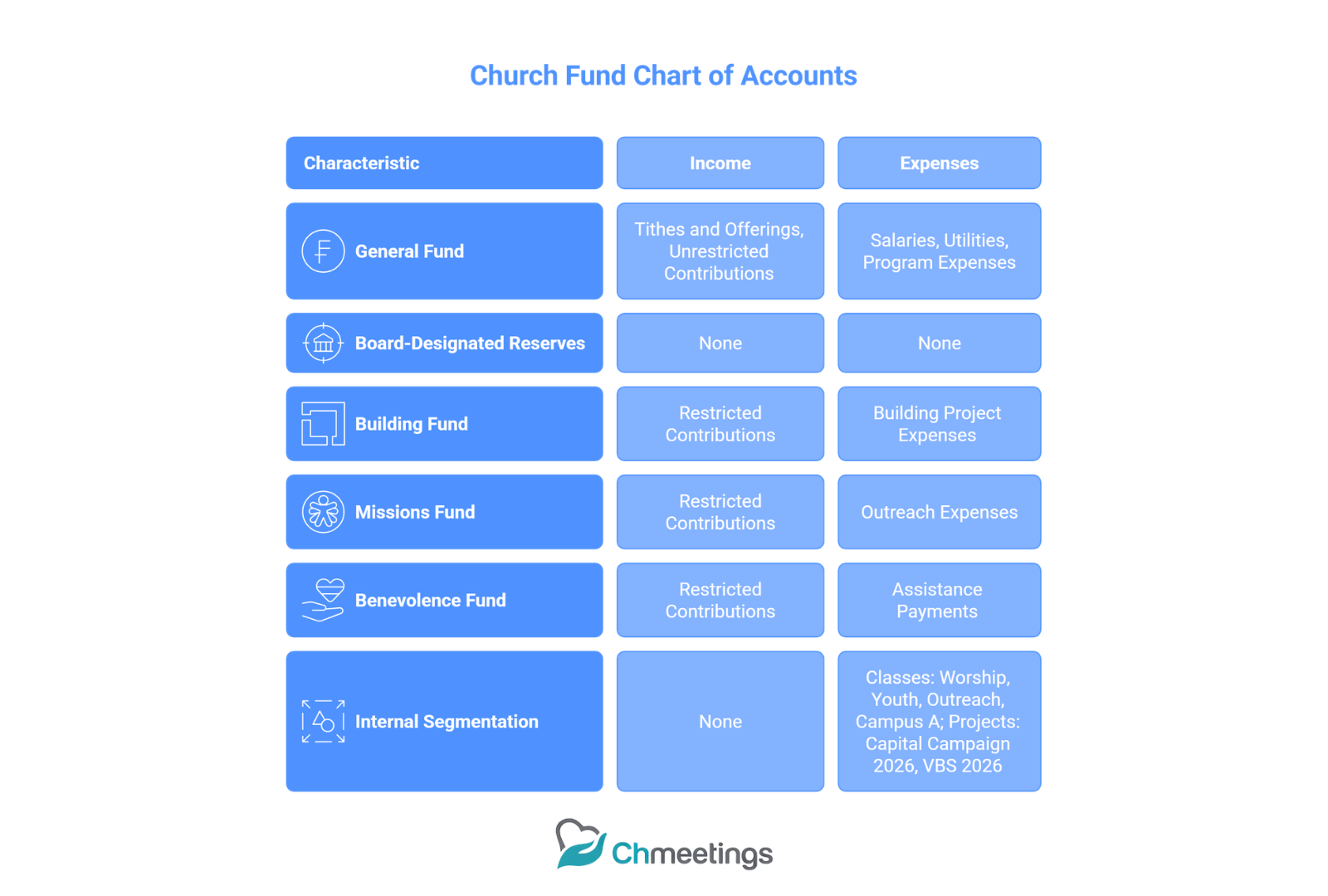
Design your chart of accounts around fund accounting principles, with clarity between restricted and unrestricted resources:
- Create a top-level split: Unrestricted Fund(s) and Donor-Restricted Fund(s).
- Under each, have income accounts (tithes, restricted contributions), and expense accounts aligned with ministries or programs.
- Maintain a separate equity or net asset section showing board-designated reserves vs donor-restricted balances. Simplicity matters. Too many funds create overhead, too few obscure donor intent.
When To Use Classes, Projects, Or Funds
Choose the tool that matches the need:
- Funds are best for tracking donor-imposed restrictions and long-term reserves.
- Classes are useful for internal segmentation, like campuses, ministries, or departments.
- Projects work well for time-limited activities, like a capital campaign or a mission trip. You can combine them, for example using a fund for a restricted capital campaign and projects to track individual phases. Plan naming conventions so staff and volunteers record gifts consistently.
Example Account Setup For A Small Church
A practical, lean setup:
- Funds: General Fund, Building Fund (donor-restricted), Missions Fund (donor-restricted), Benevolence Fund.
- Income accounts: Tithes and Offerings, Restricted Contributions, Fundraising Income.
- Expense accounts: Salaries, Utilities, Program Expenses, Outreach.
- Classes or Tags: Worship, Youth, Outreach, Campus A.
- Project codes: Capital Campaign 2026, Vacation Bible School 2026. Use consistent gift entry rules, reconcile each fund monthly, and produce simple fund balance reports for the board. A church management app can map online giving to these funds automatically and generate contribution statements, saving time and reducing errors.
How To Track And Report Funds Accurately
Accurate tracking starts with consistent gift entry, a clear chart of funds, and a monthly reconciliation routine. Make sure every gift is coded to a fund, project, or class at the time of entry, and document donor intent in the gift record so the accounting matches the promise.
What Reports Should Leadership See Monthly?
- Fund balance summary, showing beginning balance, inflows, outflows, and ending balance for each restricted fund and the general fund.
- Budget vs actual for operating and for each active restricted project, with variance explanations for items over 10 percent.
- Cash position and short-term liquidity, including restricted cash held by bank account or subaccounts.
- Pledge receivable aging, listing outstanding pledges by pledge campaign and expected receipt timing.
- Project status report for capital or mission funds, showing pledges received, cash spent, percent complete, and remaining commitments.
- Exceptions and compliance items, like missed donor reporting deadlines or conditional restrictions not yet met.
Leadership needs numbers and context, not raw detail. Keep reports short, highlight risks, and attach backup for those who want it.
How To Produce Donor Statements And Receipts
Start with a policy that determines what is automated and what needs manual review. For tax and stewardship purposes, produce two types of documents: an immediate written receipt for each gift, and consolidated contribution statements at year end or on request.
Operational steps:
- Issue a receipt on the date of deposit for any gift, with donor name, date, amount, fund designation, and a short statement about goods or services received if any.
- Create year-to-date statements showing all gifts, fund coding, and any pledge balances. Include total donated and a church tax acknowledgement line for donors needing substantiation.
- Automate as much as possible. A church management app can map online gifts to the correct fund, generate receipts at deposit, and produce year-end statements ready for mailing or secure email. That saves time and reduces errors.
- Review high-dollar or restricted gifts manually before sending the statement to confirm coding and donor instructions.
Which Metrics To Track For Restricted Funds
Track metrics that show availability, progress, and risk:
- Fund balance, current and forecasted, by project or restriction.
- Pledged versus received, percentage fulfilled, and expected timing.
- Spend rate or burn rate for active projects, months of funds remaining at current pace.
- Percent of project completed compared to percent of funds spent, to detect scope creep.
- Unused pledges that are time-limited or conditioned, flagged for follow-up.
- Ratio of restricted receipts to unrestricted receipts, to understand flexibility impact.
Watch these numbers monthly so you can act before a restricted fund stalls a project or creates an operating shortfall.
How To Budget And Forecast With Restrictions
Restricted gifts should inform plans, but they should not hide operating needs. Separate the conversation: one budget for core operations, one or more project budgets for restricted initiatives, and a consolidated view for the board.
How To Include Restricted Funds In Budgets
- Exclude donor-restricted income from the operating budget unless the donor explicitly allows use for operating. Treat restricted receipts as pass-through into the designated project budget.
- Build a project budget for each restricted fund, showing pledged income, expected cash receipts, expenses by milestone, and contingency. Link the project budget to the operating budget only for allowable indirect costs when donors permit.
- Show a consolidated forecast for the board that combines operating results and project activity so they see the whole financial picture without implying restricted money is available for day-to-day expenses.
- Revisit budgets whenever pledge fulfillment rates deviate from plan; budgets should be living documents, not filing cabinet artifacts.
How To Manage Cash Flow For Designated Projects
- Use a draw schedule tied to project milestones, not calendar dates, so spending follows progress and donor expectations.
- Hold restricted gifts in a separate bank account or a clearly labeled sub-account in your ledger, so cash management and reconciliation stay simple.
- Keep a small contingency buffer in unrestricted cash for timing mismatches; avoid borrowing from restricted funds unless the donor explicitly permits it and the board documents approval.
- Forecast receipts weekly during heavy activity phases, and schedule vendor payments to match expected inflows. If timing gaps emerge, consider short-term bridging options approved by the finance committee and documented in minutes.
Scenario Planning For Building And Missions Funds
Create three scenarios for each major restricted initiative, then update them monthly:
- Conservative, assuming 75 percent pledge fulfillment and a 3 month delay in receipts.
- Base case, using current pledge fulfillment trends and realistic vendor schedules.
- Optimistic, assuming full pledge fulfillment and on-time contractor performance.
For each scenario show cash position, monthly burn, and contingency need. Add decision triggers, for example pause construction if cash drops below two months of projected wage and vendor obligations, or delay new mission deployments until pledges reach a defined threshold. Scenario planning surfaces choices early and keeps donors and leaders informed.
How To Accept And Steward Restricted Gifts
Good stewardship begins with a clear acceptance process and continues through transparent reporting and meaningful engagement. A thoughtful policy protects donors and the church.
What To Include In A Gift Acceptance Policy
- Types of gifts accepted, including cash, checks, electronic gifts, noncash assets, and pledges.
- Criteria for accepting restrictions, for example alignment with mission, legal or compliance checks, and whether the restriction is time-limited or conditional.
- Approval thresholds that require finance committee or board sign-off, such as gifts over a dollar amount or gifts with unusual conditions.
- Procedures for naming rights, endowments, and restricted capital campaigns.
- Steps for handling noncompliant or impracticable restrictions, including efforts to contact the donor before reclassification.
- Reporting and stewardship commitments to the donor, and the process for amendments or release of restriction.
How To Acknowledge Gifts And Provide Receipts
A timely, clear acknowledgement starts stewardship and meets IRS needs:
- Send a personal thank you within 48 hours for online gifts and within a week for mailed gifts. Include a receipt for the donation amount, the fund, and any goods or benefits provided.
- For gifts of $250 or more, provide a written acknowledgement suitable for the donor’s tax records, stating amount, date, and whether any goods or services were provided.
- For restricted gifts, restate the donor’s restriction in the acknowledgement so there is no ambiguity.
- Follow up with periodic impact reports specific to the restriction, not generic updates. That keeps trust high and donors engaged.
How To Engage Members Around Designated Giving
- Tell a clear, concise story about the need and how the restricted gift will make a measurable difference. Use visuals and short progress updates.
- Offer multiple giving channels and make fund selection explicit on online forms and envelopes. Confusion at entry creates compliance headaches later.
- Provide regular, specific stewardship reports tied to milestones, not just annual summaries. Donors to designated funds want to see the outcome.
- Invite donors into the process with volunteer opportunities or site visits for capital and mission projects. Engagement turns one-time donors into long-term partners.
Sample Messaging And Receipt Wording
- Solicitation message: “Our building campaign will add classrooms for kids ministry. Your gift to the Building Fund helps us welcome more families. Would you partner with a one-time gift or a pledge?”
- Progress update: “Thanks to gifts to the Missions Fund, three teams deployed this quarter. Your funds covered supplies and partner training. Next step, we plan to support two additional communities in June.”
- Immediate receipt wording: “Thank you for your gift to [Church Name]. Date: [date]. Amount: $[amount]. Fund: [Building Fund]. No goods or services were provided in exchange for this contribution.”
- Year-end statement wording: “This statement reflects contributions made to [Church Name] during [year]. No goods or services were provided in exchange for these gifts unless noted. Please retain for tax records.”
How To Reclassify And Release Funds
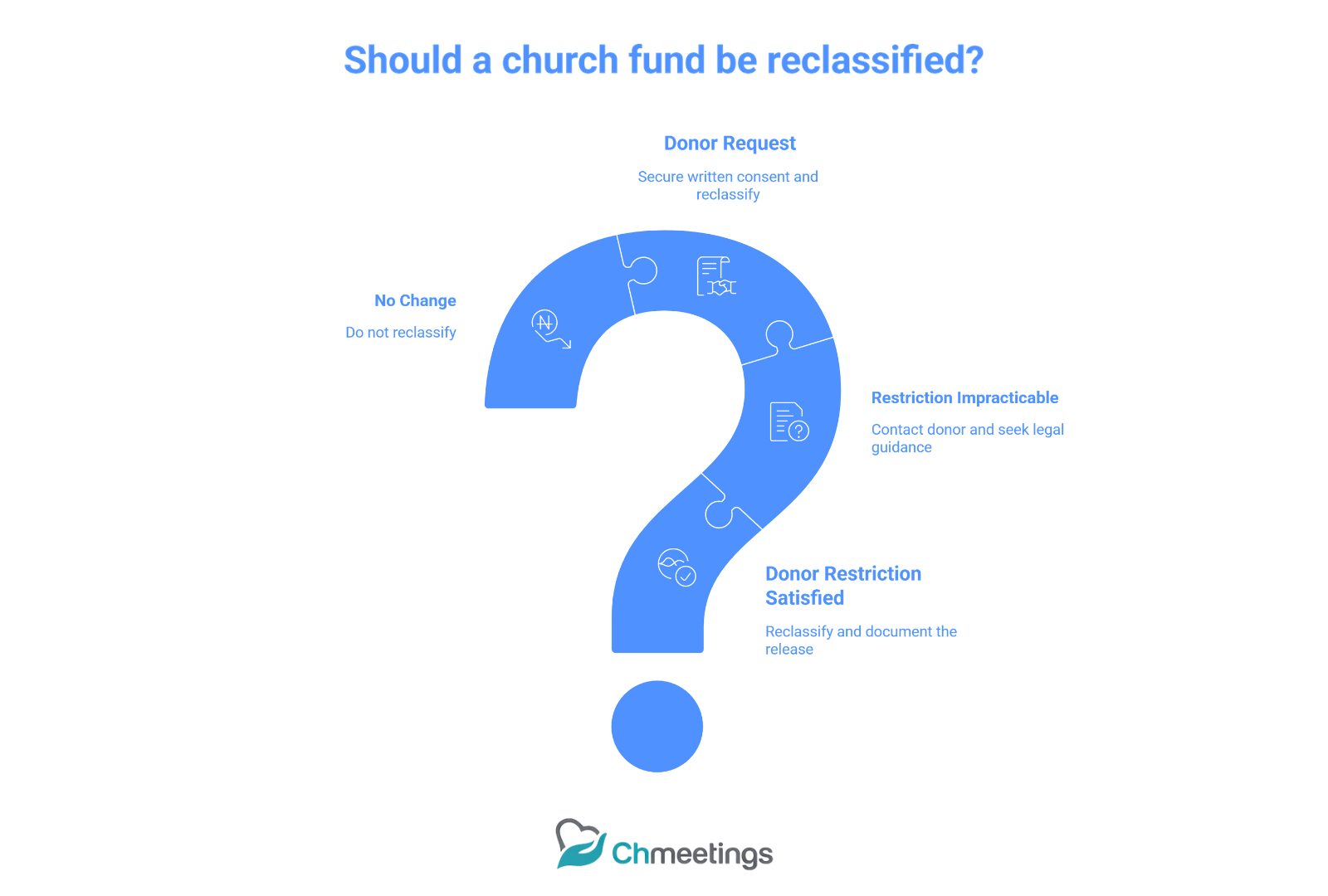
Reclassification happens when a restriction is fulfilled, amended, or found impracticable. Document every step, get appropriate approvals, and make clear accounting entries.
When To Reclassify Designated Funds
- Reclassify when the donor’s restriction is satisfied, for example a project completes or the time restriction expires.
- Reclassify only with written donor consent when the donor requests a change.
- Consider reclassification if a restriction becomes impracticable after documented attempts to contact the donor, following your gift acceptance policy and legal guidance.
- Never assume a board can unilaterally reclassify donor-restricted funds unless the gift terms or governing documents allow it.
How To Document Board Approvals
- Record a formal resolution in board minutes stating the reason for reclassification, the amount, and the effective date.
- Attach donor correspondence, copies of the original gift agreement, and any legal or counsel opinions to the minutes.
- Include a vote tally and signatory from the board chair or a designated officer.
- Save this documentation in your financial records and donor file so auditors and future leaders can trace the decision.
Journal Entries For Common Reclassifications
Below are common, clear examples. Adjust account names to match your chart of accounts.
- Receipt of a restricted gift to Building Fund:
- Debit Cash
- Credit Contributions — Building Fund (restricted revenue)
- Spending restricted cash on the building project:
- Debit Building Project Expense
- Credit Cash
- Reclassifying a restriction when the project is complete (to reflect restriction released):
- Debit Temporarily Restricted Net Assets
- Credit Net Assets Without Donor Restrictions
- Correcting a misclassified gift (after approval):
- Debit Contributions — Unrestricted (if originally posted incorrectly)
- Credit Contributions — [Correct Restricted Fund]
- Attach board approval or donor confirmation to the journal entry.
- Redirecting funds with donor permission (for example donor allows remaining scholarship funds to be used for general scholarships):
- Debit Restricted Fund Cash
- Credit Unrestricted Fund Cash (or record as contribution to the unrestricted scholarship fund)
- Document donor consent and board notation.
Whenever you reclassify, attach supporting documents to the journal entry, and include a short narrative explaining why the entry was made. That traceability is crucial for audits and donor trust.
How To Prepare For Audits And Reviews
What Documents Auditors Expect
Auditors want a clean paper trail. Give them organized, searchable copies of:
- Bank statements and reconciliations for every account and subaccount.
- General ledger and trial balance for the audit period.
- Contribution records, donor acknowledgements, pledge schedules, and copies of high-dollar gift agreements.
- Board minutes showing designations, approvals, and any fund reclassifications.
- Gift acceptance policy and gift amendment correspondence.
- Contracts, vendor invoices, and payment evidence for restricted projects.
- Year-to-date budgets, project budgets, and variance explanations.
- Internal control documentation, like approval matrices and access logs.
Label files clearly and keep a folder structure that mirrors your chart of accounts. Auditors spend less time asking questions if they can find things fast.
Common Audit Findings And Fixes
Frequent findings and practical fixes:
- Misclassified gifts, especially online entries with unclear memos. Fix: attach donor notes, retrain gift entry volunteers, and use required fund fields on forms.
- Missing written donor acknowledgements for large gifts. Fix: automate receipts and send manual confirmations for anything over set thresholds.
- Unreconciled subaccounts or stale pledge receivables. Fix: reconcile monthly, age pledges quarterly, and follow up on long-dormant pledges.
- Board minutes not documenting fund decisions. Fix: add a standard section for finance actions in each meeting agenda.
- Inadequate segregation of duties for cash handling. Fix: split responsibilities for recording, depositing, and reconciling cash, and document who does what.
Address findings quickly, document corrective steps, and save evidence. Auditors appreciate prompt, documented remediation.
How To Work With Your Accountant
Treat your accountant as a partner, not just a vendor:
- Appoint a single staff liaison who prepares materials and handles questions. That reduces back-and-forth and speeds the review.
- Do a pre-audit checklist meeting. Let the accountant say what they need, then deliver it in a well-organized folder or secure cloud share.
- Give read-only access to cloud ledgers or export clean trial balances, bank reconciliations, and gift detail reports.
- Ask for a management letter with prioritized recommendations, not just a pile of findings. Request practical fixes your team can implement.
- Schedule a short debrief after the audit to convert recommendations into action items with owners and deadlines.
A proactive, collaborative relationship lowers audit stress and improves your controls long term.
What Tools And Automations To Use
Which Software Features Matter Most
When choosing tools, look for features that enforce accuracy and save time:
- Mandatory fund mapping on gift entry, so every donation is coded at the point of receipt.
- Pledge tracking and payment schedules that tie to gift records.
- Automated receipts and year-end statement generation.
- Bank feed and reconciliation helpers to speed month-end work.
- Role-based permissions and audit trails for accountability.
- Reporting dashboards that show fund balances, pledge fulfillment, and burn rates.
A church management app that connects giving, memberships, events, and finance reduces manual handoffs and errors. Pick software that matches your size and workflow, and insists on consistent data entry.
How To Automate Donor Receipts And Reports
Automation reduces delay and compliance risk:
- Configure immediate email receipts for online gifts with fund detail and tax language. Include a clear memo showing donor restriction.
- Schedule quarterly and year-end contribution statements automatically, with filters for restricted funds and pledge balances.
- Create templated acknowledgement texts for large or complex gifts that require manual review before sending.
- Use recurring workflows to flag gifts that need follow-up, such as ambiguous memos or missing donor contact info.
- Archive all receipts and reports in a searchable, auditable folder for easy retrieval during reviews.
Automation frees staff to focus on stewardship, not paperwork.
Integrating Giving Platforms, Events, And Accounting
Integration is where mistakes disappear:
- Map each online giving form and event payment to the correct fund or project code at setup, so entries import cleanly into the ledger.
- Use payment processors that export transactions with gift-level detail, or connect directly via API to avoid manual uploads.
- For events with fees, link registration income and expense codes to a project so net results are visible by fund.
- Reconcile gateway deposits to batch-level entries rather than individual gifts when volumes are high, but keep a clear subreport for donor-level tracing.
- If you use multiple systems, keep one source of truth for giving and sync members across platforms to avoid duplicate records.
A single, connected workflow makes monthly reconciliation and donor reporting straightforward. If you want a practical church management app that handles these flows, look for one that natively maps online giving to your fund structure.
Practical Playbook, Templates, And Checklist
Fund Management Playbook Steps
A lean monthly routine that actually gets done:
- Confirm new gifts and code them to funds immediately.
- Reconcile bank accounts and restricted subaccounts.
- Update pledge receivable ledger and follow up on late payments.
- Post project expenses and verify they match approved budgets or draw schedules.
- Review fund balances versus project milestones, note variances, and flag risks.
- Produce a short fund summary for the finance committee with key metrics.
- Archive donor acknowledgements and update donor records with any restriction changes.
- Log any reclassifications or board approvals with attached documentation.
Repeat each month. Consistency prevents audit surprises and protects donor intent.
Gift Acceptance Policy Template
Use this simple template as a starting point:
- Purpose: State why the policy exists, emphasizing stewardship and legal compliance.
- Accepted gift types: Cash, checks, ACH, credit card, noncash assets, pledges, real property.
- Restriction criteria: Require written restrictions and review for alignment with mission and legal feasibility.
- Approval thresholds: Define amounts or conditions that need finance committee or board approval.
- Naming rights and endowments: State criteria and approval steps.
- Impracticability and amendment: Describe efforts to contact donors, and the process to reclassify if necessary.
- Reporting and stewardship: Commit to receipts, periodic updates, and final project reports.
Keep the template short, adopt it by board motion, and apply it consistently.
Monthly Restricted Funds Checklist
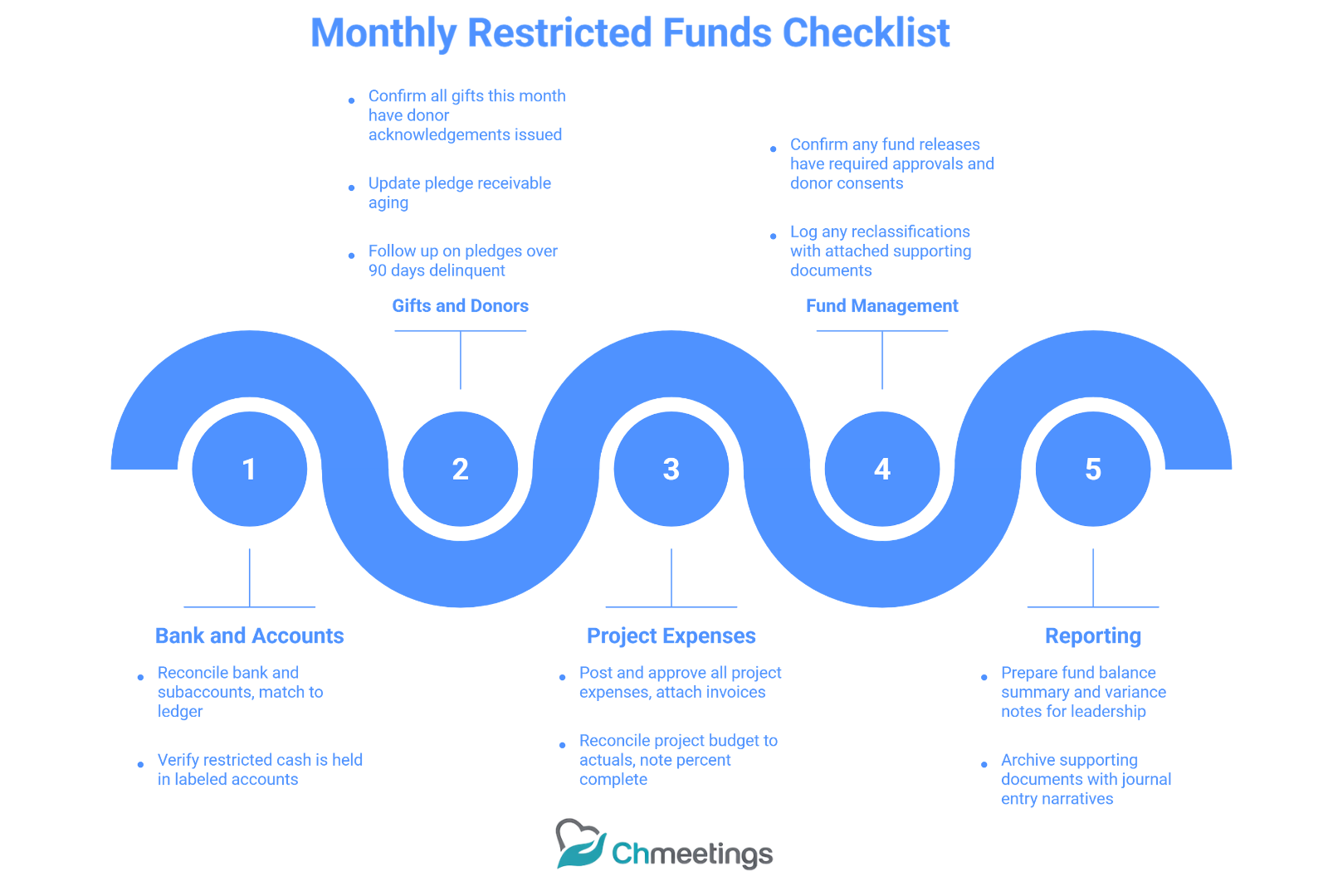
A checklist to run at month end:
- Reconcile bank and subaccounts, match to ledger.
- Verify all gifts recorded this month have donor acknowledgements issued.
- Update pledge receivable aging and follow up on >90-day delinquencies.
- Post and approve all project expenses, attach invoices to entries.
- Reconcile project budget to actuals and note percent complete.
- Confirm any fund releases have required approvals and donor consents.
- Prepare fund balance summary and variance notes for leadership.
- Archive supporting documents with journal entry narratives.
Use this checklist to make month-end predictable and auditable.
Example Ledger Entries For Typical Scenarios
Clear, consistent entries save time and questions.
- Receipt of a restricted cash gift to Building Fund:
- Debit Cash, Building Account
- Credit Contributions — Building Fund (temporarily restricted revenue)
- Recording a pledge receivable:
- Debit Pledge Receivable — Building Campaign
- Credit Pledged Revenue — Building Campaign
- Paying a contractor from the restricted building cash:
- Debit Building Project Expense
- Credit Cash, Building Account
- Releasing restriction when project completes:
- Debit Temporarily Restricted Net Assets — Building
- Credit Net Assets Without Donor Restrictions
- Correcting a misposted gift (after donor confirmation):
- Debit Contributions — Unrestricted (incorrect)
- Credit Contributions — [Correct Restricted Fund]
- Attach donor email or board approval to the entry
Include a short memo on every journal line explaining why the entry was made. That narrative is gold during audits and for future staff who inherit the files.
Common Mistakes And How To Avoid Them
Why Mixing Funds Causes Problems
Mixing restricted and unrestricted funds creates legal and practical headaches:
- Donor trust erodes if money promised for one purpose is used elsewhere.
- Financial statements become misleading, and you risk regulatory or charitable claims.
- Operational confusion arises when restricted cash is accidentally spent on payroll or utilities.
Treat restricted funds as sacred, not flexible. Separate accounts, explicit coding, and strict policy reduce temptation and error.
How Poor Communication Harms Stewardship
Silence or vagueness damages relationships quickly:
- Donors stop giving when they don’t see impact or receive clear updates.
- Staff and volunteers make entry errors when fund names or giving instructions are unclear.
- Boards make bad decisions without concise fund reports and context.
Fix it with simple, regular updates, clear giving channels, and donor-facing language that repeats the fund purpose exactly as recorded.
How To Prevent Tracking And Reporting Errors
Practical controls that work in small teams:
- Require fund selection on every gift entry, don’t allow “uncategorized” default.
- Create standard naming conventions and a short training checklist for anyone who enters gifts.
- Reconcile monthly, not quarterly. Small, frequent reconciliations catch errors before they compound.
- Use role separation for recording, approving, and reconciling cash when possible.
- Automate receipts and fund mapping to reduce manual touchpoints.
- Keep an audit log of reclassifications with attached approvals.
Prevention beats correction. Invest a little time in rules and automation, and you’ll save hours and protect donor intent.
FAQs
How Do I Manage Restricted Versus Unrestricted Funds?
Start with policy and a simple chart of funds, then make execution routine. Require fund selection at gift entry, hold donor-restricted cash in clearly labeled accounts or subaccounts, and track a project budget for every restriction. Reconcile those accounts monthly, post expenses only to the matching project or fund, and document when a restriction is met so you can reclassify the net asset. Use board minutes for any designations or approvals, keep donor acknowledgements attached to gift records, and separate who records gifts from who reconciles cash. That combination of policy, consistent data entry, and monthly review prevents mistakes and protects donor intent.
Can A Donor Change A Restriction Later?
Yes, donors can usually amend or lift a restriction, but get it in writing. Secure a signed or emailed statement from the donor that describes the new intent, attach that to the original gift record, and make the accounting reclassification with an explanatory journal memo. If the donor is unavailable or deceased, follow your gift acceptance policy and consult legal counsel before reclassifying. For complex gifts or foundation grants with conditions, require written consent from the original funder and board sign-off when necessary.
What Is The Difference Between Designated And Restricted?
Donor-restricted funds are legal promises from the donor about how money must be used. Board-designated funds are internal allocations the board can change at any time. Accounting treats donor restrictions as restricted net assets, while board designations remain part of unrestricted net assets. In practice that means donor-restricted money can’t be spent for operating needs unless the donor releases the restriction, but designated reserves can be tapped by the board when circumstances require.
Are Restricted Donations Tax Deductible?
Generally yes, gifts to a qualified church remain tax deductible whether restricted or unrestricted, provided donors receive no substantial goods or services in return. Donors need written acknowledgements for gifts of $250 or more, and any quid-pro-quo benefits reduce the deductible amount. Noncash gifts and certain large donations have extra substantiation rules, so encourage donors to consult their tax advisor for high-value or unusual gifts.
Where Can I Find IRS Rules On Designated Funds?
Start at IRS.gov, especially the pages and publications about charitable contributions and exempt organizations. Useful resources include Publication 526 on charitable contributions and the Form 8283 instructions for noncash gifts. Look for guidance on quid-pro-quo contributions and substantiation rules, and consult the IRS exempt organizations resources for charity-specific rules. For state-level rules or gift law questions about modifying restrictions, check your state attorney general’s charity division or get legal advice.
How Should Small Churches Track Restricted Gifts?
Keep it simple and consistent. Create a few named funds, require fund selection on every gift form, and keep a running pledge receivable schedule for campaigns. Reconcile restricted subaccounts monthly, attach donor acknowledgements to each gift, and keep project budgets that show pledged versus received and spent. Automate what you can, for example set online forms to map directly to fund codes and issue receipts immediately. If you want a practical tool, a church management app like ChMeetings can map online giving to funds, generate receipts, and keep pledge and gift records in one place so small teams don’t drown in spreadsheets.
Can Restricted Funds Be Used For Events Or Small Groups?
Only when the event or group matches the donor’s stated purpose. If a donor gives to “youth ministry,” using funds for a youth retreat or small group training usually fits the restriction. If the donor’s language is narrower, get written permission before spending. For events that carry registration fees or provide goods, account for any benefits that could affect tax substantiation and document how costs were allocated between restricted and unrestricted sources. When in doubt, ask the donor and record their consent.
What Steps Help Prepare For A Fund Audit?
Assemble a tidy, searchable packet: bank statements and reconciliations, general ledger and trial balance, gift detail with donor acknowledgements, pledge schedules, board minutes showing fund decisions, and contracts or invoices for restricted projects. Run a pre-audit checklist with your accountant, designate one staff member as the liaison, and provide clear narratives for any reclassifications or corrected entries. Confirm access to your accounting exports and gift reports, and fix obvious issues beforehand, like unreconciled subaccounts or missing acknowledgements. A short pre-audit meeting and organized folders save time and make audits far less painful.