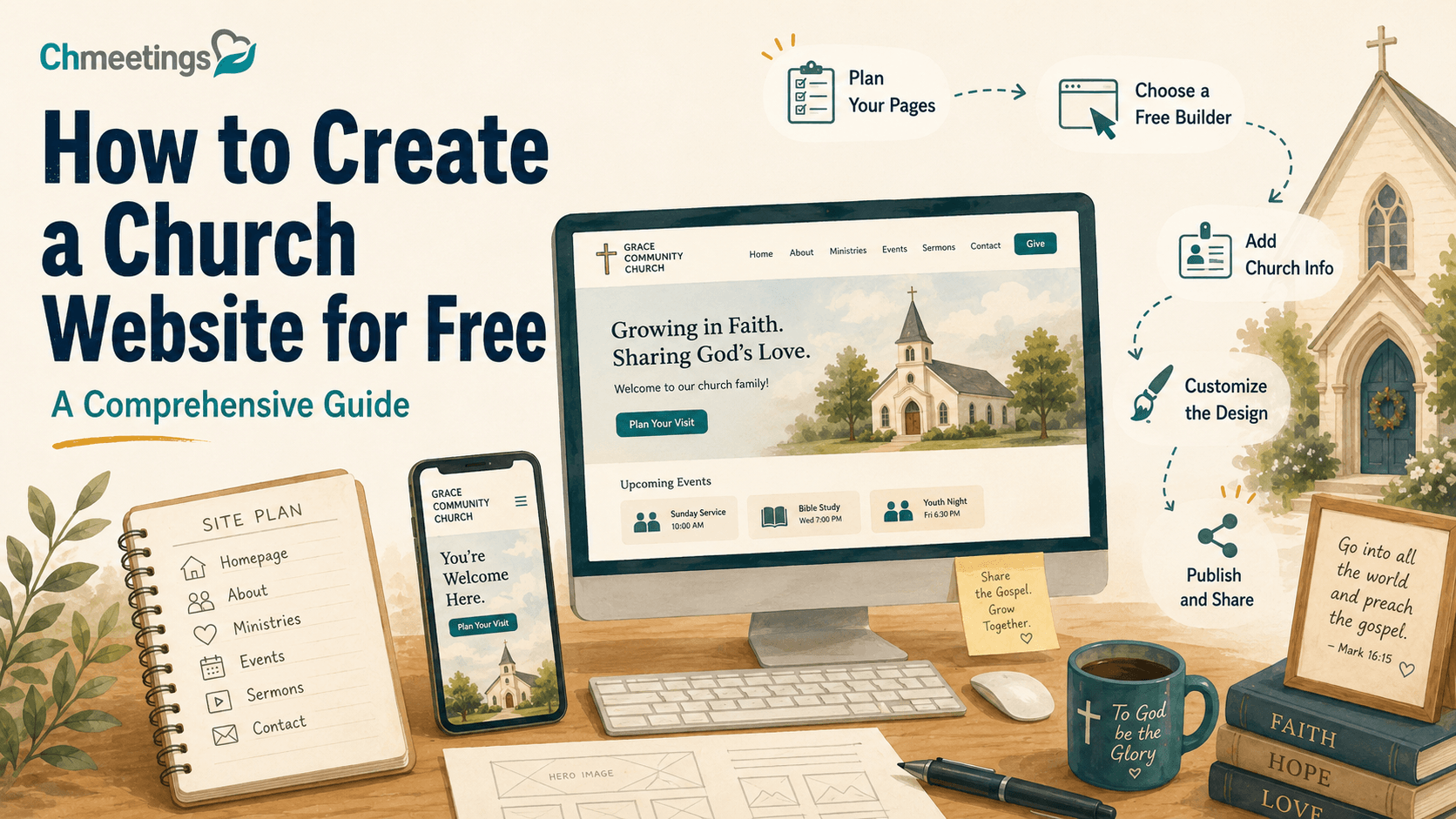

I have spent years helping churches get organized online, and the question I hear most from pastors and volunteer admins is always some version of the same thing: how do I create a church website for free without hiring a developer or blowing the outreach budget? The good news is that it is genuinely possible in 2026. The tools have gotten better, the templates have gotten smarter, and you do not need to know a single line of code.
This guide walks through everything I have learned from setting up and troubleshooting church sites, from picking a builder to promoting the finished product. If you can use Word, Facebook, or email, you already have the skills you need.
- Why Your Church Needs an Online Presence
- Choosing the Right Free Website Builder
- Step-by-Step Guide to Create Your Church Website
- Essential Features for Your Church Website
- Design Tips to Reflect Your Church Community
- Promoting Your Church Website Effectively
- Maintenance and Updates for Your Church Website
- Common Mistakes to Avoid When Creating a Church Website
- Future-Proofing Your Church Website
-
FAQs about Creating a Church Website for Free
- What is the best free platform to create a church website?
- Can I use a custom domain with a free church website?
- What features should be included on a church website?
- Are free church websites secure?
- How often should I update my church website?
- How can I promote my church website?
- What common mistakes should I avoid when creating a church website?
- Why Your Church Needs an Online Presence
- Choosing the Right Free Website Builder
- Step-by-Step Guide to Create Your Church Website
- Essential Features for Your Church Website
- Design Tips to Reflect Your Church Community
- Promoting Your Church Website Effectively
- Maintenance and Updates for Your Church Website
- Common Mistakes to Avoid When Creating a Church Website
- Future-Proofing Your Church Website
-
FAQs about Creating a Church Website for Free
- What is the best free platform to create a church website?
- Can I use a custom domain with a free church website?
- What features should be included on a church website?
- Are free church websites secure?
- How often should I update my church website?
- How can I promote my church website?
- What common mistakes should I avoid when creating a church website?
Why Your Church Needs an Online Presence
The Digital Age of Church Outreach
People do not walk past your building and decide to visit anymore. They search first. Nearly 77% of adults look up organizations online before deciding to engage with them, and a church is no exception. If your church does not show up when someone searches “church near me” or your church’s name, you are invisible to the exact people who are most curious about visiting.
I have watched this play out with small congregations that assumed word of mouth was enough. It was not. The families who found them through a simple, honest website almost always mentioned the same thing: they wanted to know what to expect before they showed up.
Impact on Visitor Retention
A website does more than get people through the door once. Around 80% of new visitors look at a church website before making a decision about attending, which means your site is often doing the work of a first impression before a greeter ever shakes a hand. If the site is confusing, outdated, or missing basic information like service times, you are losing people before they arrive.
There is also a quieter trend worth noting. Around 33% of church attendees watched an online service before attending in person, so your site is not just an information page. For many people, it is a preview of what your church actually feels like.
I have talked with visitors who described browsing three or four church websites in one evening before choosing which service to attend the following Sunday. They were not comparing theology at that stage. They were comparing whether the site felt current, whether the service time was easy to find, and whether the church looked like a place where they would be welcome. That first digital impression often decides whether someone ever walks through your doors at all.
Cost-Effectiveness of a Church Website
Building a custom church website from scratch is not cheap. A custom-built church website can run anywhere from $1,000 to over $10,000. That is a real budget line for a lot of small and mid-sized churches, especially ones already stretching every dollar toward ministry.
Free website builders exist because most churches simply do not need a custom build. A well-configured free or low-cost platform can cover 90% of what a congregation actually needs: service times, contact information, event calendars, sermon archives, and a way to give online.
Choosing the Right Free Website Builder
Key Features to Consider
Before you pick a platform, it helps to know what you are actually looking for. From setting up multiple church sites, these are the features I check first:
- Mobile-responsive templates that do not require manual resizing
- Built-in event calendar or easy calendar embedding
- Donation or giving integration, even if it is a third-party plugin
- Simple media embedding for sermon audio and video
- A free custom domain option or an affordable upgrade path
- Basic SEO controls like editable page titles and meta descriptions
Skipping this checklist is how churches end up locked into a platform that cannot grow with them.
It also helps to weigh the trade-offs of free versus paid plans honestly before you start. Free plans are excellent for testing whether a platform fits your church’s style and workflow, and they let a volunteer team learn the editor without any financial commitment. The trade-off is usually a platform-branded subdomain, limited storage for sermon audio or photos, and fewer design customization options. Paid plans remove those restrictions and typically add a real custom domain, more storage, and priority support. My advice is to start free, use it for a season, and only upgrade once you know exactly which limitation is actually holding your church back.
Top Free Website Builders for Churches
Here is a side-by-side look at the most common options churches use.
| Builder | Best For | Free Plan Limitations | Church-Specific Templates |
|---|---|---|---|
| WordPress | Long-term flexibility and blogging | Subdomain only, limited themes on free tier | Yes, through free and paid themes |
| Wix | Beginners who want drag-and-drop design | Wix branding and subdomain on free plan | Yes, dedicated church templates |
| Weebly | Simple sites with basic pages | Limited storage and bandwidth | Limited, mostly general templates |
| The Church Co | Churches wanting built-in ministry tools | Free trial only, paid after trial | Yes, church-first platform |
| Weblium | Quick setup with AI-assisted design | Watermark and limited pages on free tier | Some church-oriented layouts |
WordPress tends to be the best long-term investment because you own more of your content and can migrate more easily. Wix is usually the fastest starting point for a first-time volunteer webmaster because the editor is genuinely intuitive.
Long-term Costs of ‘Free’ Builders
“Free” almost never stays completely free forever, and that is worth planning for early. Most platforms gate custom domains, extra storage, or the removal of platform branding behind a paid tier. As one lead pastor put it plainly:
“It makes sense for your church to invest in premium features if you want to do more with your online presence.”
That is not a bait and switch. It is a reasonable business model, and most churches eventually pay a small monthly fee once the site proves useful. The key is starting free so you are not guessing about whether the investment is worth it.
Step-by-Step Guide to Create Your Church Website
Step 1: Choose and Register Your Domain
Your domain is your church’s address online, so treat it with the same care you would a physical sign out front. Keep it short, easy to spell out loud, and as close to your church’s actual name as possible.
A few practical tips:
- Avoid abbreviations that visitors would not guess on their own
- Check that the .org or .com version is available before settling on a name
- If your exact name is taken, add your city rather than a random number or symbol
- Register through the builder if it offers a free domain, or through a registrar if you want more control later
Many builders will let you connect a custom domain even on a free trial, but the domain registration itself sometimes carries a small annual fee outside the platform’s free tier.
Step 2: Select a Template
Templates are where a lot of church volunteers get stuck, mostly from overchoice. My advice is to pick a template based on structure first and style second. Look for templates that already include a homepage, an about page, a service times section, and a blank events page. It is far easier to restyle a well-organized template than to reorganize a beautiful but disorganized one.
Most builders let you preview templates without creating an account, so take the time to click through two or three before committing.
Pay attention to how each template handles navigation on mobile, since that is where most of your visitors will actually land. A template that looks impressive on a desktop preview but collapses into a confusing mobile menu will cost you more visitors than a plainer template that works cleanly on a phone. If you are choosing between two templates and cannot decide, pick the one with fewer built-in animations and more straightforward text blocks. Simpler templates are almost always easier for a volunteer to maintain a year from now.
Step 3: Customize Your Site
Once you have a template, focus on the basics before the decorative touches:
- Update the homepage headline and hero image to reflect your actual congregation
- Add your service times and physical address near the top of the homepage
- Set up your navigation menu with no more than five or six main items
- Add a contact page with a working email and phone number
- Connect your domain and preview the site on both desktop and mobile
I always tell church admins to resist the urge to fill every page on day one. A clean five-page site that loads fast beats a cluttered fifteen-page site every time.
Once those basics are live, do a slow read-through as if you were a first-time visitor rather than the person who built it. Click every menu item. Check that every button actually goes somewhere. Test the contact form by sending yourself a message. Small broken links are one of the fastest ways to lose a visitor’s trust, and they are also one of the easiest things to catch before launch if you take fifteen minutes to walk through the site with fresh eyes.
Essential Features for Your Church Website
Homepage Must-Haves
Your homepage carries the most weight because it is where nearly every first-time visitor lands. At minimum, it should include your service times, your address with a map link, a short welcome message, and a clear next step such as “Plan Your Visit.”
Event Calendars and Online Booking
An up-to-date calendar tells visitors your church is active and organized. This is one area where a dedicated church management platform pays off, since manually updating a static calendar page every week is a fast way for volunteers to burn out. Tools like Try ChMeetings Today let you manage events, RSVPs, and communication in one place, then embed or link that calendar directly on your website so it stays current without extra manual work.
Online booking matters just as much for smaller gatherings as it does for big events. Small group sign-ups, volunteer scheduling, and baptism registrations all benefit from a simple form rather than a phone call or a paper sign-up sheet at the back of the sanctuary. Even a basic embedded form reduces the administrative back-and-forth for your staff and makes it easier for a hesitant first-timer to commit to something small before committing to a full Sunday visit.
Donation integration deserves its own attention here as well. Visitors researching your church online often want to know whether giving is easy and secure before they ever consider it. A dedicated giving page, separate from your general contact page, with a clear explanation of how funds are used, builds far more trust than a generic donate button buried in the footer.
Embedding Sermon Videos
If your church records services, embedding sermon video or audio gives visitors a real sense of your teaching style before they ever attend in person. Most free builders support embedding from YouTube, Vimeo, or a podcast host with a simple copy-and-paste embed code. Keep the most recent sermon front and center, and archive older ones on a dedicated sermons page so the homepage does not get cluttered.
Design Tips to Reflect Your Church Community
Choosing Colors That Reflect Your Faith
Color choices set a tone before a single word is read. Warmer palettes tend to feel welcoming and community-focused, while cooler, more muted palettes often read as calm and reflective. There is no universally correct choice here. The goal is consistency with how your church actually feels in person, so a first-time visitor’s online impression matches their in-person experience.
Using Images of Your Community and Events
Stock photos are tempting because they are fast and polished, but they rarely convince anyone. Real photos of your congregation, your building, and your events do more to build trust than a professional model smiling on a generic church aisle. If your church does not have a photo library yet, dedicating one Sunday to casual candid photography solves this quickly.
Ensuring Accessibility for All Users
Accessibility is often the first thing skipped and the first thing visitors notice when it is missing. A few basics go a long way:
- Use sufficient color contrast between text and background
- Add alt text to every meaningful image
- Keep font sizes readable without zooming
- Avoid auto-playing video or audio with sound
These small adjustments also tend to improve how search engines read your site, so accessibility and SEO often reinforce each other.
Accessibility also matters for the practical, everyday reality of your congregation. Many churches serve older members who rely on larger text, or families who browse the site on an older phone with a smaller screen. Testing your site with someone outside your usual web team, ideally someone less comfortable with technology, will surface problems that a designer’s eye tends to miss entirely.
Promoting Your Church Website Effectively
Social Media Integration
Your website and your social media should reinforce each other rather than compete. Link your social profiles clearly in the site footer, and reciprocally, link back to your website from every social bio. When you post an event on social media, that post should point to the matching event page on your site, not just describe the event in a caption.
SEO Best Practices for Churches
Search engine optimization sounds intimidating, but for a church website it comes down to a few consistent habits. Use your actual church name and city in page titles. Write a short, specific meta description for each page rather than leaving it blank. Keep your service times and address text-based rather than only inside an image, since search engines cannot read text embedded in a picture.
Blogging consistently also compounds over time. Websites with blogs can have up to 434% more indexed pages, which leads to greater visibility in search results. Even a monthly reflection or event recap adds new, indexable content that gives your church more ways to show up in local search.
Claiming and completing a free Google Business Profile is another step that pays off quickly and costs nothing. It puts your service times, address, and reviews directly in local search and map results, often before someone even clicks through to your website. Keep the information on your Google profile and your website consistent, since mismatched addresses or hours between the two can confuse both visitors and search engines.
Using Email Marketing for Updates
Not every visitor will check your website weekly, but many will open an email. A simple monthly newsletter linking back to your latest blog post, upcoming events, and sermon archive keeps your website as the hub of your church’s communication rather than a page people forget exists after their first visit.
Maintenance and Updates for Your Church Website
Creating a Content Calendar
A church website that goes stale loses trust fast. Nothing signals neglect like a homepage advertising an event from eight months ago. I recommend assigning one volunteer or staff member to a simple monthly checklist: update the calendar, refresh the latest sermon, and check that service times and contact information are still accurate.
Gathering User Feedback
Ask your own congregation what confused them the first time they used the site. Church members are often more honest and specific than anonymous analytics data, and they will tell you directly if the giving page is hard to find or the service times are buried.
A short, informal survey after a service, or even a quick show of hands during announcements asking who has visited the website recently, can surface issues faster than waiting for a formal review. I have found that a single offhand comment from a visitor, such as “I could not find your address on my phone,” is often worth more than a month of analytics data.
Using Analytics to Improve Visitor Experience
Most free builders include basic analytics showing which pages get visited and where people drop off. You do not need to become a data analyst. Just check monthly whether your most important pages, like service times and plan your visit, are actually the ones people are viewing.
Common Mistakes to Avoid When Creating a Church Website
Mobile Optimization Fails
This is the single most common mistake I see. Roughly 60% of web traffic comes from mobile devices, so a site that only looks good on a laptop is failing the majority of its visitors. Always preview your site on an actual phone, not just the builder’s mobile preview mode, before publishing.
Importance of Website Security
Free website security is not automatically weak, but it does depend on how the platform and the church maintain it. As one source on the topic put it:
“It’s critical to choose a builder that offers security features and to regularly update content to avoid security breaches.”
Use strong, unique passwords for the site admin account, enable two-factor authentication if the platform supports it, and avoid installing unnecessary third-party plugins that create extra points of vulnerability.
Ignoring User Engagement Metrics
Publishing a site and never looking at it again is a missed opportunity. Even a quick monthly glance at page views can tell you whether your promotion efforts are working or whether a key page needs to be more visible in your navigation.
Future-Proofing Your Church Website
Keeping Up with Tech Trends
You do not need to chase every new feature, but a yearly review of your platform’s newer tools is worth the time. Builders regularly add features like improved mobile editors, better calendar integrations, or accessibility tools that were not available when you first built the site.
The Importance of Routine Updates
Treat your website like a living part of your ministry rather than a one-time project. A quarterly review of every page, checking for outdated information, broken links, and old photos, keeps the site trustworthy.
Planning for Growth and Changes
A free plan that works for a congregation of 80 people may not hold up once you are running multiple services or campuses. Choose a platform with a clear, reasonably priced upgrade path so that growth does not force a full site rebuild down the road.
Before that growth happens, it helps to think through a few questions with your team. Will you eventually need separate pages for multiple campuses or services? Will your storage needs grow as you archive more sermon video? Will you want deeper integration between your website and your church management software as your volunteer team expands? None of these need to be solved on day one, but knowing your platform can handle them later will save you from a stressful, last-minute migration.
FAQs about Creating a Church Website for Free
What is the best free platform to create a church website?
There is no single best platform for every church. WordPress offers the most long-term flexibility and ownership, Wix is often the easiest for a first-time volunteer to design quickly, and dedicated platforms like The Church Co include more built-in ministry features from the start. Choose based on how comfortable your team is with design tools and how much long-term control you want over the site.
Can I use a custom domain with a free church website?
Often yes, though it varies by platform. Some builders include a free custom domain for a limited time or as part of a specific plan, while others require a paid upgrade to remove the platform’s subdomain. It is generally worth the small annual cost of owning your domain outright, since it protects your church’s branding if you ever switch platforms.
What features should be included on a church website?
At a minimum, include service times, a physical address with directions, a way to contact the church, an events calendar, sermon archives, and an online giving option. These cover the questions nearly every first-time visitor is trying to answer before they show up.
Are free church websites secure?
Security depends more on how the site is maintained than on whether the plan is free or paid. Choose a reputable builder, use strong admin credentials, and keep any plugins or integrations updated. Avoid free platforms with no track record or support documentation.
How often should I update my church website?
A monthly check of your calendar and sermon archive keeps the site current, while a quarterly review of every page catches outdated information or broken links. Treat it as ongoing ministry maintenance rather than a project you finish once.
How can I promote my church website?
Share it consistently across social media, include it in email newsletters, and print the URL on physical materials like bulletins and signage. Writing occasional blog posts or event recaps also improves how easily your site shows up in local search results over time.
What common mistakes should I avoid when creating a church website?
The most frequent mistakes are neglecting mobile optimization, letting the calendar and sermon archive go stale, and skipping basic security practices like strong passwords. Regularly reviewing the site with a small checklist prevents most of these issues before they become visible to visitors.