

- What Is A Church Chart Of Accounts?
- Why Your Church Needs One
- What Accounts Should You Include
- How To Design Account Numbers
- How To Track Restricted Funds
- Which Template Format Works Best
- How To Build A Template Step By Step
- How To Migrate To Accounting Software
- How To Report To Leadership
- What Internal Controls To Implement
- What Metrics To Track
- Common Mistakes To Avoid
- Templates, Checklist, Playbook
- FAQs
What Is A Church Chart Of Accounts?
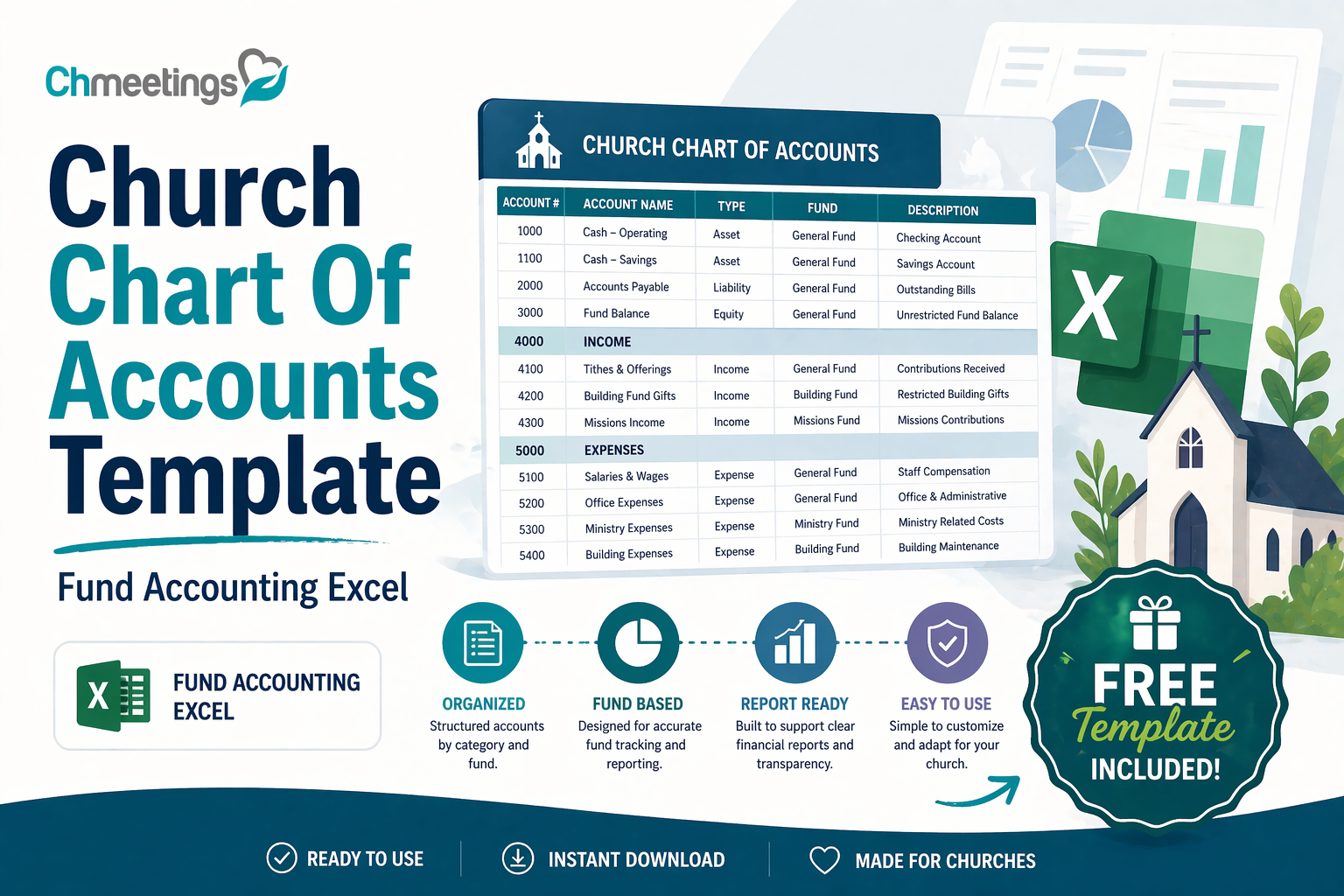
A church chart of accounts is a structured list of every financial account your church uses to record transactions. It groups similar income, expense, asset, liability, and net asset items so giving, spending, and balances are recorded consistently.
Purpose And Business Value
A clear chart of accounts makes day to day bookkeeping repeatable and reliable. It gives leaders and the finance team a common language for budgets, reports, and conversations. That consistency saves time, reduces errors, and makes monthly and annual reporting meaningful for the board and congregation. In short, it turns raw transactions into useful financial information that supports wise stewardship.
How It Differs From A Business Chart
Church accounting is mission driven, not profit driven. That affects how you classify transactions, especially donations and restricted gifts. Businesses focus on owner equity and profit centers. Churches focus on fund balances and program stewardship. Also, congregations expect donor transparency, so accounts often need more granularity by ministry or fund than a typical business chart would use.
Fund Accounting Essentials

Fund accounting organizes resources by purpose, not by profit center. You track unrestricted, temporarily restricted, and permanently restricted funds separately so you can show donors their gifts were used as intended. The chart of accounts must support those fund classifications, with net asset accounts that reconcile to each fund balance. Proper fund tracking lets you report program expenses against the exact funding source, which is essential for stewardship and compliance.
Why Your Church Needs One
A well designed chart of accounts is more than bookkeeping. It protects trust, supports decisions, and prepares your church for scrutiny.
Improve Transparency And Donor Trust
When contributions are tracked to the right funds and ministries, you can give donors accurate statements and public reports. That kind of clarity builds confidence. Donors want to know their gifts supported worship, missions, or building projects, not disappear into vague categories.
Simplify Budgeting And Decision Making
A tidy chart lets leaders roll up ministry spending or drill into details without rebuilding spreadsheets. You can compare actuals to budget by ministry, program, or fund quickly. That means faster, more confident decisions about staff, programs, and capital needs.
Prepare For Audits And Form 990
Auditors and the IRS expect consistent classification of revenue and expenses. A sensible chart of accounts makes it easier to produce schedules, reconcile accounts, and explain restricted gifts. That reduces audit time and helps you file Form 990 with fewer questions and less last minute scrambling.
What Accounts Should You Include
Design your chart so reports answer the questions your leaders and donors ask most. Aim for coverage, not clutter.
Revenue Categories (Tithes, Offerings, Grants)
Include accounts for regular tithes, general offerings, online giving, designated donations, grants, program fees, and fundraising events. Separate unrestricted from temporarily and permanently restricted revenue. If you receive government or foundation grants, have specific grant revenue accounts to match grant reporting requirements.
Expense Categories (Staff, Ministries, Facilities)

Create accounts for payroll and benefits, clergy support, worship, children and youth ministries, outreach, discipleship, and facilities costs like utilities, maintenance, and insurance. Break out professional services, supplies, travel, and fundraising expense so you can see program versus overhead spending.
Asset, Liability, And Net Asset Accounts
Track cash accounts by bank or purpose, receivables, investments, and fixed assets with accumulated depreciation. Liabilities should include accounts payable, payroll liabilities, loans, and mortgage balances. Net asset accounts must reflect unrestricted, temporarily restricted, and permanently restricted balances so financial statements reconcile to fund reports.
Event And Program Tracking Accounts
Give major events and recurring programs their own income and expense accounts or subaccounts. That makes it easy to measure profitability or net cost per event, and to provide clear post-event reports to leaders or sponsors. Use consistent naming and numbering so event results are comparable year to year.
How To Design Account Numbers
A thoughtful numbering system keeps the chart usable as you grow. Balance simplicity with future flexibility.
Simple Numbering Structures For Small Churches
Small churches benefit from a short, intuitive scheme. Use four main blocks, for example:
- 1000 assets
- 2000 liabilities
- 3000 net assets
- 4000 revenue
- 5000 expenses
Keep numbers sequential and leave gaps between groups so you can add accounts without renumbering everything.
Expanded Structures For Larger Ministries
Larger or multi site churches need more granularity. Introduce segments for fund, department, and account type. For example use an 8 or 10 digit pattern where the first segment is fund, the second is department, and the last is the account. That makes it possible to run consolidated or site specific reports without changing account names.
Examples With Subaccount Patterns

Practical patterns you can adapt:
- 100-01-110 Cash, where 100 is assets, 01 is main campus, 110 is cash account
- 400-02-4100 Tithes, where 400 is revenue, 02 is youth ministry, 4100 is tithes
- 500-03-5200 Worship Salaries, where 500 is expenses, 03 is worship, 5200 is payroll
If you use a church management app for online giving and contribution statements, map those giving sources to the account numbers so donations post automatically to the right fund. That reduces manual work and keeps ministry leaders informed.
How To Track Restricted Funds
Setting Up Temporarily And Permanently Restricted Accounts
Create separate net asset accounts for temporarily restricted and permanently restricted gifts, and number them so they’re easy to find. For temporarily restricted gifts, use a subaccount per purpose or campaign so you can track when restrictions are met and reclassify to unrestricted revenue. Permanently restricted gifts go into an endowment or principal account and stay there, with only investment earnings recorded to spendable income accounts. Document the reclassification process and approval steps so anyone on the finance team can move funds correctly when donor conditions are fulfilled. Keep the chart simple enough that ministry leaders can find their fund balances without calling the treasurer.
Donor Restriction Documentation And Reporting
Capture donor intent in writing for every restricted gift, whether it’s an email, pledge form, or grant agreement, and store that file with the gift record. Record the restriction code or fund name on contribution entries so statements and reports tie back to the original instruction. Reconcile restricted fund balances monthly, matching gifts, transfers, and program expenses to donor documentation. Produce donor-facing statements that show beginning balance, gifts, expenses, and ending balance for the restricted fund. Keep a clear audit trail, because auditors and donors will want to see how you honored each restriction.
Best Practices For Grant Tracking
Set up a unique grant revenue account and matching expense accounts for each grant or major funding source, so you can report by grant without digging through general entries. Track budgets, milestones, and drawdowns in a grant subledger or spreadsheet, and attach supporting invoices and progress reports to each draw. Follow the grant terms exactly, record matching requirements separately, and date expenses to the correct grant period. Reconcile grant income to bank deposits and close the grant account when final reporting and audits are complete. Maintain a single point person for grant stewardship so nothing slips through the cracks.
Which Template Format Works Best
Choosing Between Excel, Word, And PDF
Use Excel for the working copy of your chart of accounts, because formulas, sorting, and import-ready layouts save time. Word or PDF are fine for distributing the official chart and policies to ministry leaders, but they won’t help with imports or reconciliations. Keep a locked, printable PDF as the formal reference, and a living Excel file for updates and exports. Always version your master Excel file and note who approved changes and when.
When To Use A QuickBooks Template
Choose a QuickBooks chart template only if QuickBooks is your accounting system, because QuickBooks includes account types and import formats that save setup time. Decide whether you’ll use classes or locations for ministries before importing, so your structure isn’t fragmented later. Remember QuickBooks isn’t a full fund accounting system out of the box, so plan how you’ll present net assets and donor restrictions in reports. If you use a church management software for giving, map those giving categories to the QuickBooks accounts before you go live.
What To Look For In Free Downloads
Prefer templates that follow fund accounting principles, include account numbers, and offer sample financial statements. Check that the download is in Excel and provides an import-ready CSV layout, not just a printable PDF. Look for templates from reputable church or nonprofit sources and recent updates, so tax and reporting categories are current. Avoid templates that add dozens of unnecessary accounts, or that lack guidance on restricted funds and reclassification.
How To Build A Template Step By Step
Identify Ministries, Programs, And Reporting Needs
Talk with pastors, ministry leaders, and the board to list the ministries and programs that need their own reporting. Decide the level of detail you’ll report to leadership and donors, then design account groups to match those needs. Create naming conventions that reflect ministry, fund, and account type so reports are readable. Keep future scaling in mind, leave number gaps for growth, and document the rationale behind each account.
Map Transactions To Accounts
For each income and expense type, assign a default account and note exceptions. Map bank accounts, online giving sources, payroll items, grant awards, and fundraising events to specific accounts so entries are consistent. Write short coding rules for volunteers and staff, for example how to code reimbursements or shared facility costs. Store that mapping in the chart of accounts file so new bookkeepers can follow the rules without guessing.
Test The Chart With Sample Entries
Enter a month of sample transactions, including payroll, bank transfers, restricted gifts, and a grant draw, then run a trial balance and key reports. Verify that restricted funds move to unrestricted when conditions are met, and that ministry P&Ls show correct expense allocations. Ask ministry leaders to review their reports and flag confusing names or missing detail. Tweak account names and numbers, then lock the chart before year end so comparisons are stable.
How To Migrate To Accounting Software
Importing A Chart From Excel Or CSV

Prepare a clean Excel or CSV with columns for account number, account name, account type, and description, and remove blank or duplicate rows. Backup your current system, then import in small batches so you can catch mapping errors early. Match each account type in the file to the software’s account types to avoid misclassification. Keep a log of the import steps and any manual adjustments so you can reproduce or reverse the process if needed. If you use a church management software like ChMeetings for giving, export giving categories in the same format so gifts map correctly on first sync.
QuickBooks Desktop And Online Mapping Tips
In QuickBooks Online use classes or locations to represent ministries, and in Desktop consider job or class tracking depending on your edition. Make sure payroll items, bank accounts, and equity accounts map to the proper QuickBooks types before you import balances. If moving between Desktop and Online, use an export tool or rebuild the chart deliberately, checking that subaccounts and classes survived the transfer. Set opening balances as single-date entries and reconcile them immediately to prevent phantom discrepancies.
Reconcile And Validate After Migration
After migration, reconcile each bank and credit card account to statements for the last closed month. Compare trial balances and net asset totals to the old system, and investigate any variances with supporting journal entries. Run fund-specific reports, hand them to ministry leaders for sanity checks, and correct misclassified transactions promptly. Keep the old system available in read-only mode for at least one reporting cycle, and document lessons learned so future migrations go smoother.
How To Report To Leadership
Leaders need clear, timely financial info, not pages of transactions. Build reports that answer two questions, how are we doing against budget and are funds being used as donors intended. Deliver a concise monthly package and a deeper quarterly package for the board.
Board Reports And Key Schedules
Prepare a one page executive summary up front with actual versus budget totals, year to date performance, and a brief note on anything unusual. Include these schedules behind the summary:
- Statement of financial position by fund, showing unrestricted and restricted net assets.
- Income and expense by program or ministry, with budget comparisons.
- Cash flow summary showing month end cash and committed cash for projects.
- Schedule of restricted fund activity, listing beginning balance, gifts, expenses, transfers, and ending balance.
- Key vendor or loan schedules and any covenant or compliance items.
Keep commentary short and specific, not narrative. Flag variances over a threshold, for example 5 percent or $1,000, and propose corrective steps. Send the packet at least one week before the board meeting so leaders have time to review.
Program And Fund Statements
Produce program P&Ls that show both revenue and expenses for each ministry or fund, and net position. For each program include:
- Revenue by source, including designated gifts and grants.
- Direct program expenses and allocated shared costs with the allocation method noted.
- Net cost per participant or per event when useful.
For restricted funds, present a fund statement with donor restrictions clearly labeled, and show when restrictions will be satisfied so money can be reclassified. Use consistent report layouts month to month so leaders can compare trends.
Preparing Year End Reports And Form 990
Start year end prep early. Reconcile all bank and brokerage accounts, fix cut off issues, and confirm payroll and benefits totals with providers. Produce an audited or reviewed financial statement if your size or donors expect it. For Form 990:
- Reconcile totals from your financial statements to the Form 990 line items.
- Prepare schedules for grants, related party transactions, and functional expense allocation.
- Gather supporting documentation for large gifts, executive compensation, and grant agreements.
Document assumptions used in allocations and have the board approve compensation disclosures in writing. A clear year end package reduces auditor questions and speeds up filing.
What Internal Controls To Implement
Good controls protect assets and preserve trust. You don’t need bureaucracy, you need practical checks that fit your size.
Segregation Of Duties And Approval Flows
Separate the person who records transactions from the person who approves them and from the person who handles cash or makes deposits. For small teams, use compensating controls like mandatory dual approvals for checks and online transfers, and periodic independent reviews by a board finance member. Set approval thresholds, for example:
- Under $500, one staff approval.
- $500 to $5,000, finance director plus one leader.
- Over $5,000, finance director plus board finance committee approval.
Record approvals in writing, email, or within your accounting system so there’s an audit trail.
Bank Reconciliations And Audit Trails
Reconcile every bank and credit card account monthly, by someone who does not prepare checks or run payroll. Keep scanned bank statements, deposit slips, and reconciliation worksheets attached to the reconciliation file. Require two signatures or electronic approvals for opening or closing accounts. Maintain a log of all system access and changes to the chart of accounts and major journal entries so you can trace who made what change and why.
Reconciling Online Giving And Deposits
Match online contribution reports to bank deposits daily or weekly. Use donation batch reports from your church management app if available, because they show donor totals, fees, and net deposit. Reconcile processing fees to statements and allocate fees to the proper expense account, or to the donor’s fund if your policy allows donors to cover fees. Keep a deposit log for any cash or checks collected at services and attach the count sheet to the bank deposit slip. When variances occur, investigate immediately and document the resolution.
What Metrics To Track
Focus on metrics that help stewardship, planning, and short term decision making. Track a mix of giving, expense, liquidity, and program measures.
Giving, Expense, And Program Ratios
Track these ratios monthly:
- Giving growth rate, month over month and year over year.
- Program to overhead ratio, program expenses divided by total expenses.
- Restricted to unrestricted income ratio, to spot dependency on designated dollars.
- Fundraising cost ratio, fundraising expense divided by funds raised.
Set targets based on your context, for example aim for at least 65 percent of operating expense in direct program spending if that aligns with your mission and donor expectations.
Liquidity And Reserve Targets
Measure cash on hand, expressed in months of operating expense. A common target is 3 to 6 months, but larger or multi site churches may aim higher. Track an emergency reserve balance separately from designated capital or building funds. Report reserve activity each month and show how commitments or capital projects affect available cash. If reserves fall below target, include a replenishment plan in the next budget.
Dashboard Examples For Pastors And Treasurers
Design two dashboards, one for pastors and one for treasurers:
- Pastor dashboard, single page: weekly giving trend, attendance trend, top three ministry P&Ls, most critical cash alerts.
- Treasurer dashboard, more detailed: balance sheet by fund, rolling cash forecast, variance to budget by department, outstanding payables and restricted fund balances.
Use visual cues, like red for negative trends and green for targets met, so leaders can scan quickly. If you use a church management app that supports dashboards, link giving categories and bank feeds so numbers update automatically and reduce manual work.
Common Mistakes To Avoid
Learn from common pitfalls so you don’t waste time fixing avoidable problems.
Overcomplicating The Account Structure
Too many accounts hides information instead of clarifying it. If leaders can’t find relevant numbers, they’ll ignore reports. Start with essential accounts and add only when a reporting need is clear and recurring. Leave gaps in numbering for growth. Document why each account exists and who owns it.
Mixing Restricted And Unrestricted Funds
Mixing funds erodes donor trust and creates headaches at audit time. Always record gifts to the correct fund at entry, and only reclassify when donor conditions are met and documented. Produce regular restricted fund schedules and reconcile them monthly. If you discover a mispost, correct it immediately and explain it in the next board report.
Failing To Train Staff And Volunteers
Systems and policies mean little without training. Provide simple coding rules, run short onboarding sessions for anyone who handles money, and keep a one page quick reference for common transactions. Cross train so vacations or turnover don’t paralyze the finance function. Regularly review controls and refresh training when processes or systems change.
Templates, Checklist, Playbook
Downloadable COA Templates (Excel, Word, PDF)
Provide three file types so every team has what they need. Use Excel as your working master, set up with columns for account number, account name, type, fund, department, and import-ready fields. Offer a clean Word document that describes naming conventions, approval steps, and who owns each account, so ministry leaders can read the policy without opening Excel. Publish a locked PDF as the official reference, stamped with the approval date and version number. Include at least one sample import CSV for common accounting systems and one sample chart that demonstrates fund accounting with restricted, temporarily restricted, and unrestricted net asset accounts. If you accept online giving, include a mapping sheet so each giving category maps to an Excel account number for importing into your accounting software and for tying deposits back to funds.
Setup Checklist For Treasurers
A short checklist makes setup repeatable and audit friendly. Key items:
- Approve the chart structure with board finance committee, document the version number.
- Assign account owners and approval thresholds, and record them in the Word policy file.
- Create bank account and online giving mappings, including deposit and fee accounts.
- Set up user access, signatories, and segregation of duties, and log who has each permission.
- Import the Excel chart into your accounting system in a test company, review mappings, then import live.
- Reconcile opening balances and run a trial balance, check net asset totals against prior records.
- Train staff and volunteers on coding rules and provide a one page quick reference.
- Schedule monthly restricted fund reconciliations and quarterly reviews with ministry leaders.
Mark each step done with initials and date so future treasurers can see who set things up and when.
Monthly And Year End Playbook
Make month end a routine, not a scramble. Monthly tasks:
- Reconcile all bank and credit card accounts to statements.
- Reconcile online giving batches to deposits, using exported batch reports from your church management app like ChMeetings when available.
- Post payroll, benefits, and tax liabilities, then reconcile payroll liabilities.
- Run fund statements, restricted fund schedule, and program P&Ls; send to ministry owners for review.
- Investigate and clear reconciling items, attach support for large or unusual entries.
Year end tasks, start early:
- Close subsidiary ledgers, reconcile fixed asset schedules and depreciation.
- Reconcile donations by donor and fund, prepare contribution statements.
- Produce audited or reviewed financial statements if required, and assemble schedules for Form 990.
- Freeze account structure for the fiscal year and document any approved changes for next year.
- Prepare board-approved year end package with net asset rollforward, grant reconciliations, and any covenant or loan schedules.
Keep a short timeline with owners and deadlines. Repeatable lists reduce errors and make audits far easier.
FAQs
How Do I Get A Free Church Chart Of Accounts Template?
Look for templates from reputable church or nonprofit organizations that follow fund accounting. Prefer a downloadable Excel master with an import-ready CSV, plus a printable PDF policy. Many denominational offices and nonprofit resource centers offer free templates. If your church uses a church management app that handles giving, export your giving categories and match them to the template before you import, that saves manual work.
Can I Use QuickBooks For A Church Chart?
Yes, QuickBooks works for many churches, but be aware it is not a native fund accounting system. Use classes or locations to simulate funds and ministries, map your net asset accounts carefully, and plan how you will present donor restricted balances on reports. If you rely on QuickBooks, test imports and reporting before you go live, and consider supplemental schedules for true fund statements.
Should My Church Use Excel Or Accounting Software?
Use both. Keep Excel as the living master for your chart of accounts, policy, and import files. Use accounting software for daily transactions, reconciliations, payroll, and audit trails. Small churches may start with Excel plus a simple accounting system, but as giving, staff, or programs grow, software reduces manual errors and saves hours on reconciliations and reporting.
How Do I Separate Restricted Donations?
Record restricted gifts directly to fund-specific revenue accounts or subaccounts at entry, and attach donor restriction documentation to each gift record. Reconcile restricted fund activity monthly, showing beginning balance, gifts, expenses, transfers, and ending balance. Only reclassify a gift to unrestricted when documented donor restrictions are satisfied, and log who approved the reclassification. Use your accounting system or church management app tags to make donor-level reporting easier.
How Many Accounts Should A Small Church Have?
There’s no single number, but aim for clarity not complexity. A typical small church can operate with 40 to 100 accounts, grouped roughly as:
- Assets 5 to 10 (cash, receivables, fixed assets)
- Liabilities 5 to 10 (payables, payroll liabilities, loans)
- Net assets 3 to 6 (unrestricted, temporarily restricted by major fund, permanently restricted)
- Revenue 8 to 20 (tithes, offerings, online giving, designated funds, grants)
- Expenses 15 to 50 (payroll group, worship, children, facilities, admin, program-specific)
Start smaller, leave number gaps for growth, and add accounts only when a recurring reporting need exists.





