
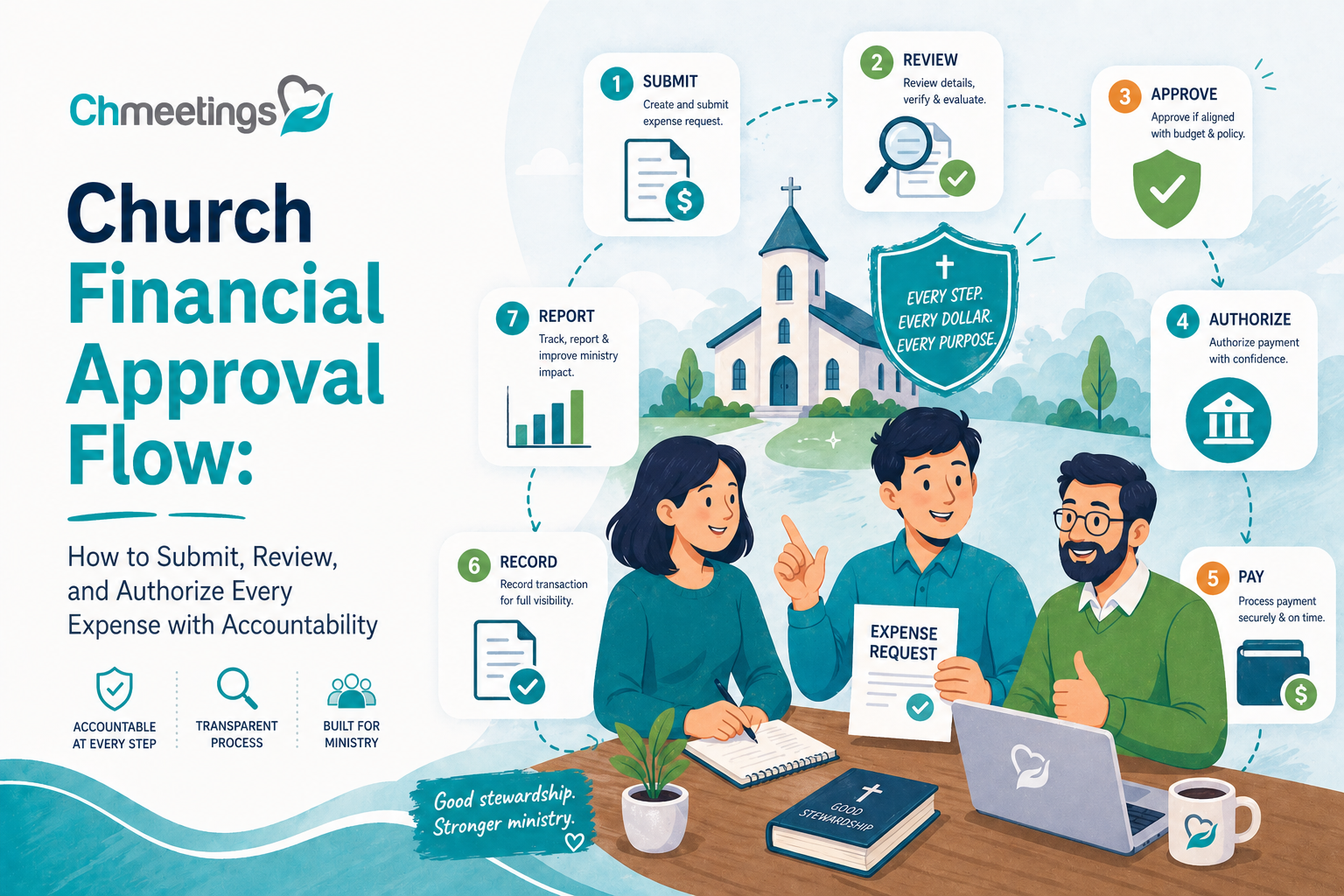

What Is The Church Financial Approval Flow?
Map The Core Approval Steps
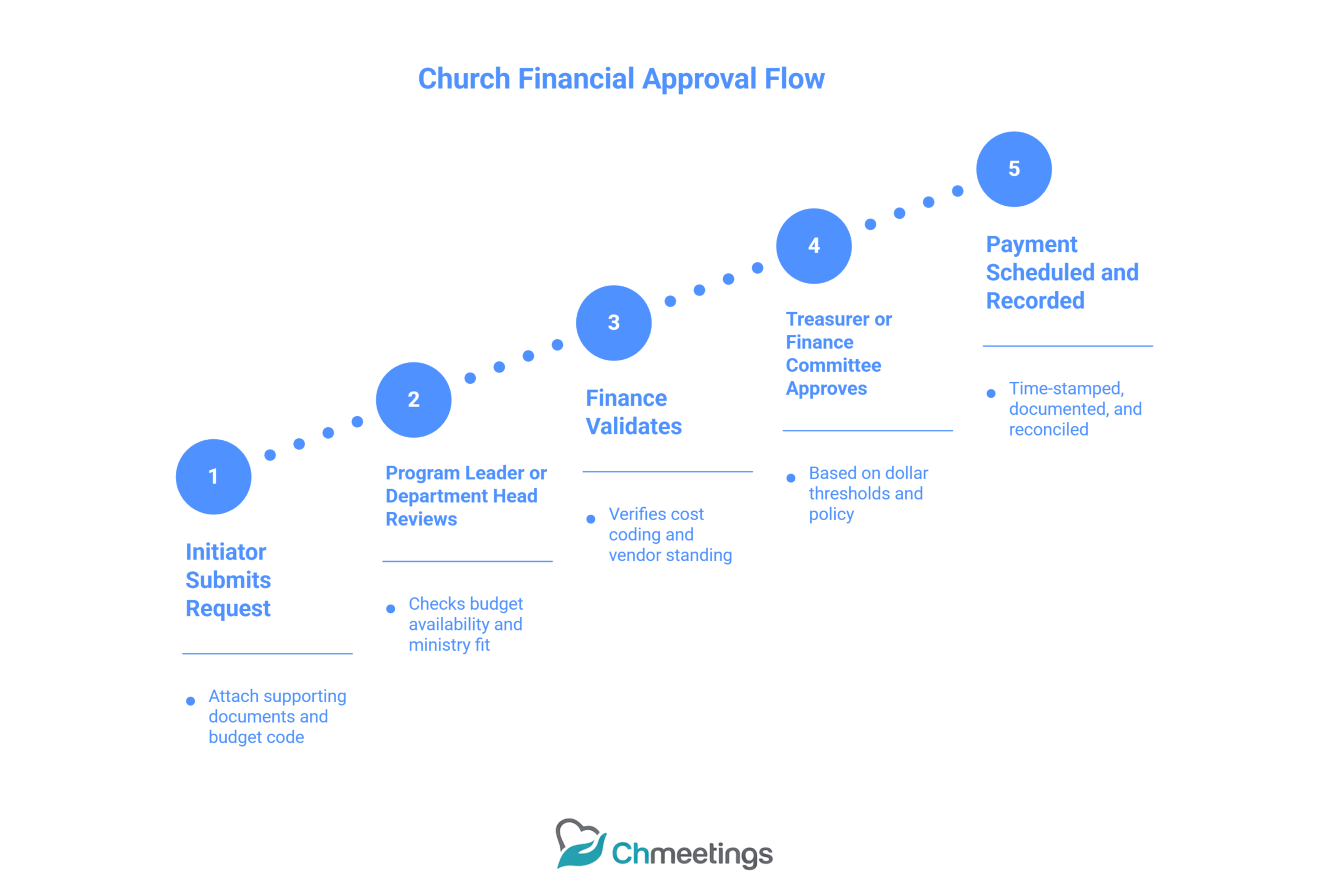
Start with the request, attach supporting documents, and route it for review. Typical steps are initiator submits request, program leader or department head reviews for budget and ministry fit, finance checks cost coding and vendor standing, treasurer or finance committee gives final approval based on thresholds, then payment is scheduled and recorded. Each step should require a clear deliverable, like an approved purchase order, vendor quote, or ministry justification. That keeps each handoff auditable and defensible.
Define Request To Payment Stages
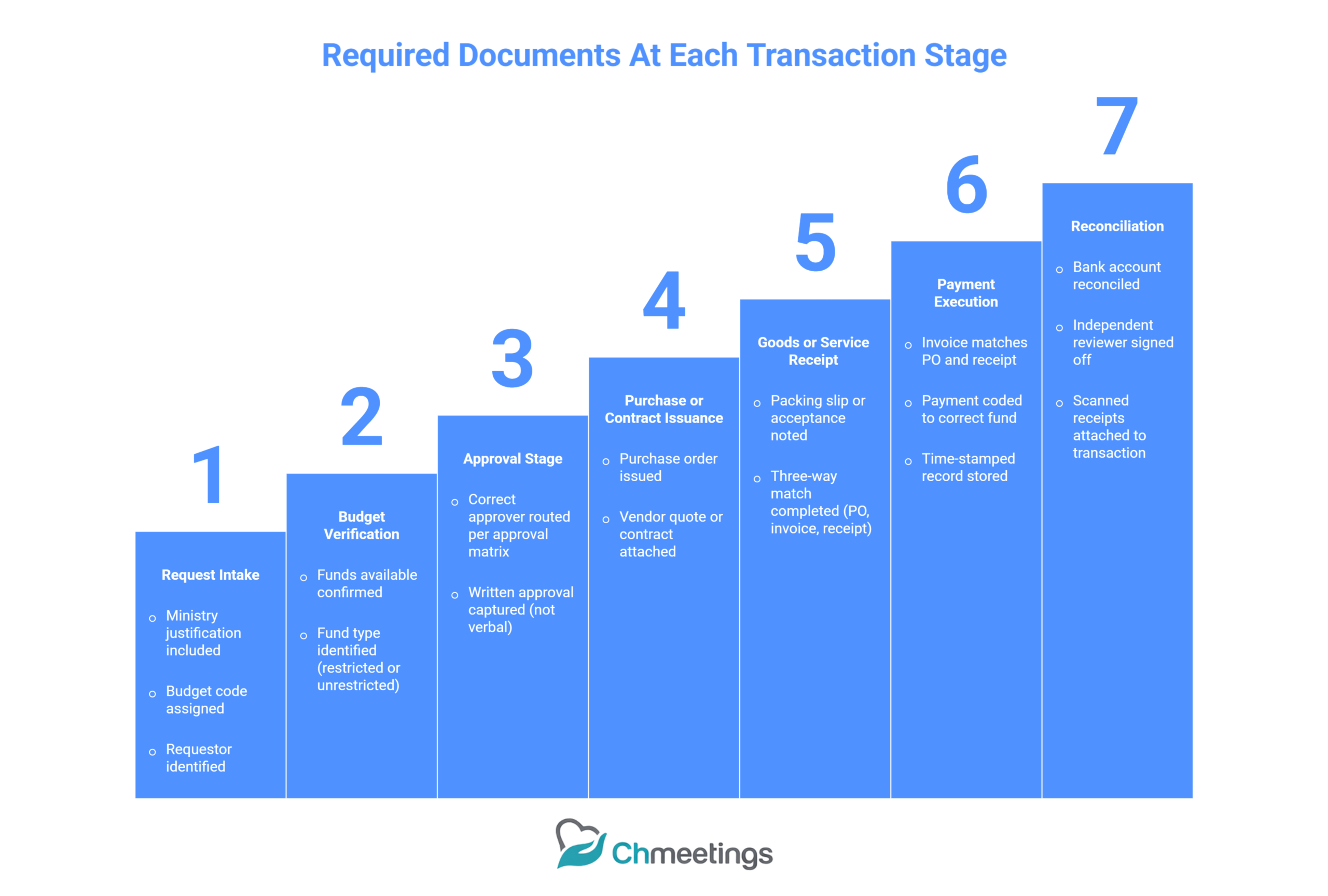
Break the process into distinct stages: request intake, budget verification, approval(s), purchase or contract issuance, receipting and goods acceptance, invoice matching, payment execution, and reconciliation. Segregate duties so the person approving a purchase is not the person paying the bill. Track each stage with time stamps and a required document set so you can answer who did what and when.
Show Approval Timelines And SLAs
Set realistic service level agreements so requests don’t linger. Examples: routine small purchases processed in 3 business days, mid‑level approvals in 5 to 10 days, major or capital requests in 2 to 4 weeks. Build an expedited SLA for mission‑critical spending, with a documented emergency route. Publish SLAs to ministry leaders so expectations are clear and measure them monthly to spot bottlenecks.
Illustrate Escalation Paths
Define escalation triggers, like SLA breaches, incomplete documentation, vendor red flags, or budget shortfalls. Typical path is finance associate, finance manager, treasurer, and then pastor or board for unresolved or high‑risk issues. Require written justifications at each escalation step and set maximum time allowed before moving up the chain. This prevents single points of failure and keeps leadership informed when decisions need to be accelerated.
If you’re building your financial foundation from scratch, the Church Accounting Guide walks through everything you need to know before diving into approval flow.
And if you’re looking for the bigger picture beyond finances, the Ultimate Church Management Guide covers every aspect of running a healthy, organized church.
Who Approves What? Roles And Authority
Clarify Board, Treasurer, Pastor Roles
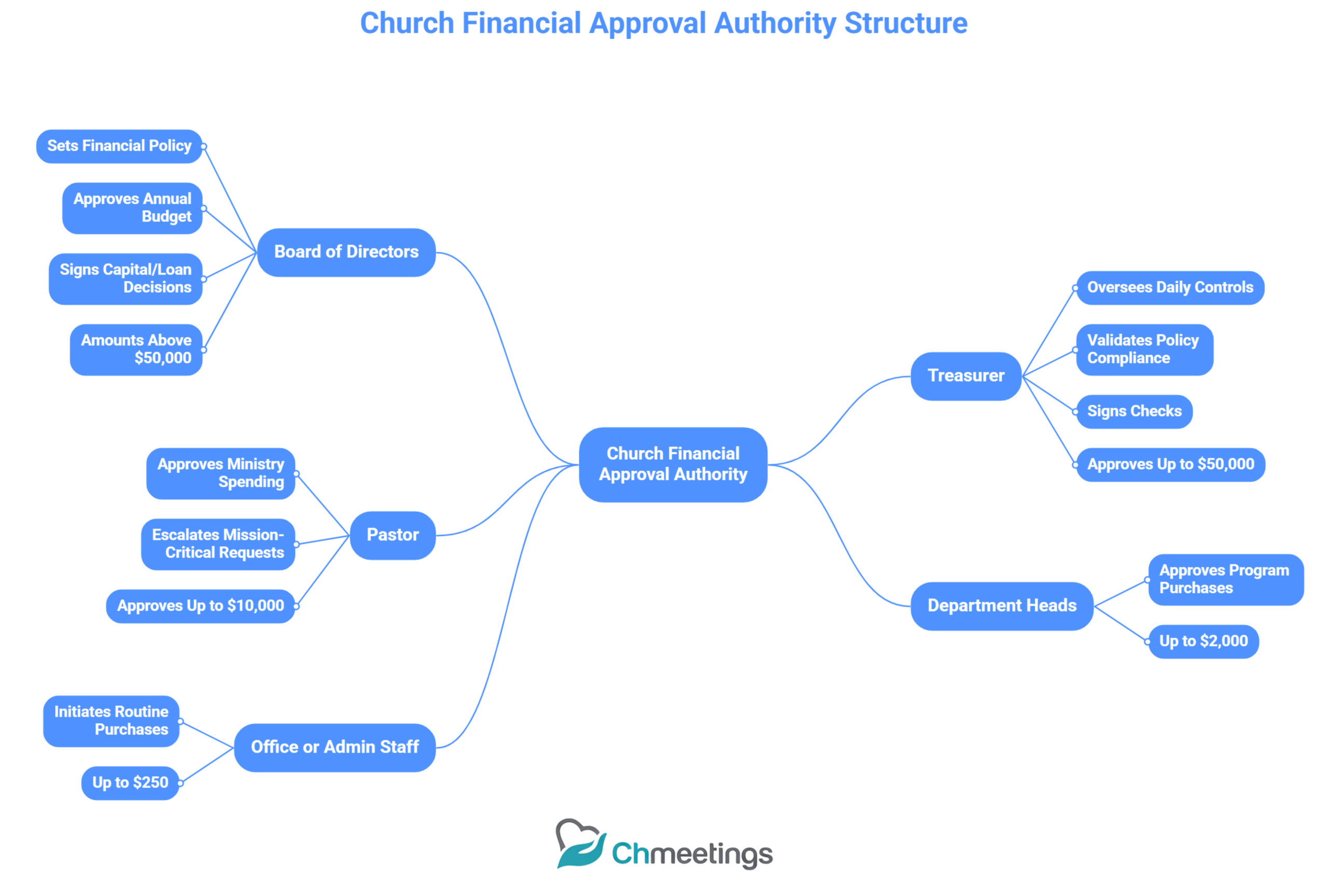
The board sets financial policy, approves budgets, and signs off on major capital or loan decisions. The treasurer oversees daily financial controls, validates compliance with policy, and signs checks within delegated limits. The pastor approves ministry spending consistent with budget and mission, and brings exceptional or mission‑critical asks to the treasurer or board. Spell these boundaries out in your governance documents so people know where authority begins and ends.
Assign Staff And Volunteer Permissions
Give permissions by role, not by person. Department leaders can request and approve up to a set threshold. Finance staff can code transactions and process payments but should not approve their own requests. Volunteers with procurement duties should have limited access and paired approvals. Use least privilege, logging, and periodic reviews to revoke or adjust permissions as staff and volunteers change.
Handle Denominational And Congregation Approvals
Some decisions require denominational oversight or a congregational vote, for example property sales, taking on debt, or changing bylaws. Map those requirements up front, include timelines for convocations or district approvals, and prepare the supporting materials the denomination or congregation will require. Communicate those needs early to avoid surprises and delays.
Create An Approval Matrix
Capture approvals in a simple matrix, columns for amount bands, purpose, primary approver, secondary approver, and required documents. Publish it in the finance policy and make it part of onboarding. Review the matrix annually or when leadership changes so it stays aligned with the church’s risk tolerance and size.
How To Set Approval Thresholds
Establish Dollar Limits By Role
Tie dollar limits to role responsibility and church size. A sample approach: administrative purchases up to $250 by office staff, department heads up to $2,000, pastor up to $10,000, treasurer up to $50,000, board approval required above $50,000. Adjust these bands for your budget and risk appetite, and review them at least once a year.
Require Multi‑Signer Rules For Large Payments
For large disbursements require two or more signers from different roles, for example one officer plus one board chair. For electronic payments require two independent approvers before funds leave the account. This reduces fraud risk and keeps stewardship visible.
Define Emergency Spending Authority
Set a narrow emergency threshold and a fast, documented approval path for urgent needs, for example immediate repairs that prevent safety issues. Require quick written notice to the treasurer and pastor, and post‑fact approvals by the finance committee or board within a fixed window, like 72 hours. Keep emergency authority limited and audited after the fact.
Manage Restricted Funds Separately
Restricted or donor designated monies follow specific rules. Require fund custodian approval plus treasurer oversight before spending restricted funds. Always check donor intent and document how expenditures match the restriction. Report restricted fund use regularly to donors and in annual financials.
How To Build An Approval Workflow
Design Paper Versus Digital Flows
Paper works for very small churches, but it’s hard to audit and easy to lose. A digital workflow creates timestamps, enforces rules, and stores documents centrally. Many churches see immediate wins moving approvals into a church management app that ties requests to budgets and giving records. If you must keep paper, use a hybrid approach where signed forms are scanned and attached to the digital record.
Create Stepwise Approval Checkpoints
Design checkpoints that gate progress, for example: budget availability check, vendor vetting, program leader approval, finance validation, treasurer signoff, and payment scheduling. Each checkpoint should require a specific artifact, like an invoice, contract, or purchase order. That prevents incomplete requests from clogging the queue.
Add Conditional And Recurring Approvals
Build rules that change the flow based on conditions, such as higher approvals for new vendors or capital projects, or additional reviews for grant‑funded spending. For recurring payments, set automatic approvals but require a periodic review, perhaps every six months, to confirm continuation is justified.
Use Flowcharts For Clarity
Turn the workflow into a simple flowchart and place it where ministry leaders can see it. Use boxes for actions, diamonds for decisions, and color code roles. Flowcharts reduce questions, speed training, and make it obvious where backups are needed. Keep one canonical chart linked to your finance policy and update it when thresholds or roles change.
How To Document And Track Transactions
Require Supporting Documents And Receipts
Always attach source documents to every transaction, like vendor invoices, quotes, purchase orders, packing slips, and original receipts. Require requestors to include a brief ministry justification and the budget code when they submit a purchase or reimbursement. Make incomplete submissions a hard stop in the workflow so approvers never have to guess why money was spent.
Standardize Purchase Orders And Expense Reports
Use a consistent purchase order template and a single expense report form so approvals and coding are predictable. Include fields for approver, fund code, program, project, and expected receipt date. Standard forms reduce review time, make routing simpler, and speed reconciliation at month end.
Maintain A Digital Audit Trail
Capture every action in a central, time stamped record: who submitted, who approved, and when payment occurred. Store scanned receipts and contracts alongside the transaction so audits are quick and defensible. A church management app like ChMeetings or another church management software can link giving, budgets, and expense records so you see the full lifecycle without hunting through folders.
Set Record Retention Policies
Define how long to keep financial records for routine transactions, payroll, tax returns, and donor records, and align that with legal and denominational requirements. Publish retention periods and a schedule for secure destruction, and require finance to certify compliance annually. Consistent retention reduces risk and makes audits and grant requests straightforward.
How To Manage Donations And Restricted Funds
Record Donor Intent And Restrictions
Log donor intent at the time of gift, whether online, on a pledge card, or in a note from the donor. Capture restriction details, start and end dates, and any conditions so finance can match spending to intent. Treat donor instructions as binding until you obtain written permission to reclassify the gift.
Segregate Accounts For Designated Gifts
Segregate restricted gifts in your ledger with distinct fund codes and, when appropriate, separate bank accounts or subledgers for stewardship clarity. Use internal controls so only authorized fund custodians can approve spending from those accounts. Segregation prevents accidental use of designated funds and simplifies donor reporting.
Report Use Of Restricted Funds To Donors
Offer regular, concise reports to major donors and to the congregation about how restricted funds were used, including amounts, outcomes, and remaining balances. Match reports to donor expectations—monthly for active campaigns, annual summaries for memorials or endowments. Transparent reporting builds trust and encourages continued giving.
Handle Refunds And Gift Reversals
Create a clear policy for refunds and reversals, specifying approval authority, time limits, and documentation required. When reversing a restricted gift, consult the donor or follow the legal process for reclassification if the donor can’t be reached. Record every reversal against the original gift so your audit trail shows intent and action.
How To Approve Payments And Payroll
Implement Vendor Vetting And Contracts
Require basic vendor due diligence before first payment: tax ID or W9, proof of insurance if needed, references for larger contracts, and an approved contract for ongoing services. Maintain an approved vendor list with expiration dates for certificates and contracts. Vetting reduces fraud and protects the church legally.
Standardize Invoice Approval Steps
Require invoices to be matched to purchase orders or service acceptance before approval, with a simple three‑way check when useful: PO, invoice, and receipt of goods or service. Route invoices through the same approval matrix used for purchases, with clear cutoffs for who can authorize payment. This consistency avoids duplicate payments and coding errors.
Require Receipts For Reimbursements
Make original receipts mandatory for all reimbursements except when an agreed per diem applies. Reimbursements should be preapproved when possible, coded to the correct fund, and submitted within a defined window, for example 30 days. Hold supervisors accountable for verifying the business purpose before signing.
Authorize Payroll Changes And Timesheets
Require written authorization for hires, terminations, salary changes, and bonuses, signed by the supervisor and treasurer before payroll runs. Implement a routine process for timesheet approval for hourly staff and volunteers who are paid, with supervisor signoff each pay period. Keep change logs for any post‑payroll adjustments and reconcile them monthly.
Classify Contractors Versus Employees
Apply objective tests to determine worker status, document the basis for classification, and collect appropriate tax forms, like W9s for contractors. Misclassification carries legal and tax risks, so when in doubt consult your payroll provider or an advisor. Treat contractors as vendors, not staff, and avoid payroll-style benefits unless they meet employee criteria.
How To Plan And Approve The Budget
Run An Annual Budget Cycle
Start budget planning early, with a calendar that sets deadlines for ministry submissions, finance consolidation, and board review. Use a consistent method, zero based or incremental, and require ministries to justify new or increased line items. Publish a final calendar so leaders can plan ministry timelines around budget decisions.
Approve Ministry Budgets And Line Items
Require each ministry leader to submit a narrative and line‑item budget tied to measurable outcomes, then review those requests against overall priorities and available funds. Route approvals through department heads, finance, and whoever holds delegated authority per your approval matrix. Lock approved line items to prevent unapproved spending.
Track Variances And Reforecast Regularly
Compare budget to actual monthly, highlight material variances, and ask ministries for corrective actions when trends emerge. Reforecast quarterly or more often if giving or expenses shift, and use reforecasts to update leadership before major decisions. Small course corrections beat surprise deficits.
Key Financial Metrics To Track
Monitor cash on hand, months of operating reserve, pledge fulfillment rate, giving trends by source, program to administrative expense ratio, and variance to budget. Watch timely metrics like weekly giving vs budget and payroll as a percentage of expenses. These indicators tell you when to tighten controls or accelerate ministry investment.
How To Prevent Fraud And Strengthen Controls
Enforce Segregation Of Duties
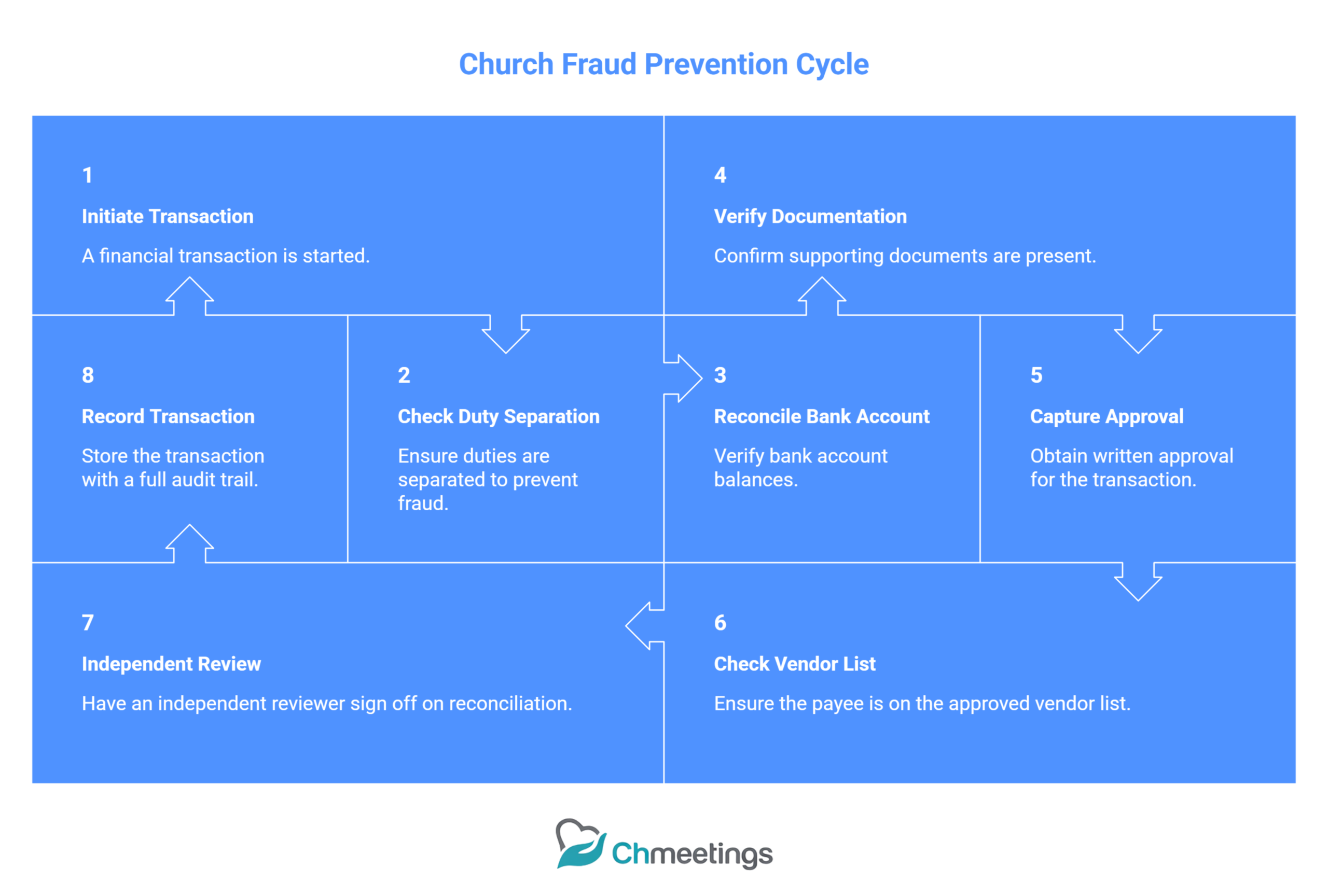
Split critical tasks so no one person can request, approve, and pay the same expense. Typical separation: requestors and program leaders initiate and justify spending, finance staff code and match invoices, and signers or officers approve payments. For small churches, use paired approvals or require an outside reviewer when roles overlap. Periodically review role assignments and adjust when volunteers or staff change.
Reconcile Bank Accounts Regularly
Reconcile bank and merchant accounts at least monthly, tie each transaction to a supporting document, and have someone independent of day-to-day bookkeeping review the reconciliation. Flag unusual items, stale checks, or unfamiliar payees immediately. Use blind reconciliations for a second reviewer when possible, where the reviewer checks balances and totals without seeing the preparer’s notes.
Schedule Surprise Or Internal Audits
Plan both scheduled and surprise internal checks of petty cash, inventory, and vendor files. Surprise reviews deter theft and surface weak controls before they become problems. Keep findings concise, document corrective actions with deadlines, and report material issues to the treasurer or finance committee so leadership can act.
Create A Fraud Response Playbook
Write a simple, stepwise fraud playbook that covers detection, containment, investigation, reporting, and recovery. Assign roles, legal and law enforcement contact points, confidentiality rules, and communication limits. Include a checklist for preserving evidence, steps to suspend implicated accounts, and a requirement to update controls after any confirmed incident.
How To Choose Software And Automate Approvals
List Must Have Approval Features
Look for configurable workflows, role based permissions, multi‑tier approvals, time stamped audit trails, document attachment fields, threshold rules, and reporting on SLAs. Ensure the system supports conditional routing, two‑step signoffs for high amounts, and easy export for auditors. Practical features like recurring approvals and vendor master data save time.
Compare Spreadsheets Versus Church Software
Spreadsheets are flexible and familiar, but they’re fragile, prone to version errors, and offer little auditability. A church management app centralizes requests, attachments, budgets, and approvals with enforced rules and logs, so you stop chasing emails and sticky notes. For churches ready to scale ministry, the move from disconnected files to integrated software reduces risk and frees leaders to focus on mission.
Integrate Giving, Banking, And Payroll
Choose tools that link giving records, bank feeds, and payroll or make integration straightforward. When giving and bank transactions are connected to approvals, restricted funds, and budgets, reconciliations become faster and donor intent stays visible. Payroll integration prevents pay changes slipping through approvals and keeps headcount costs aligned with budgets.
Secure Mobile And Remote Approvals
Support for mobile approvals increases speed, but security matters. Require strong authentication, limit mobile roles to approval only, log every remote action, and set time windows for urgent approvals. Build a clear policy for approving on the go, for example no approvals without attached receipts for amounts over a set threshold.
How To Train Staff And Volunteers
Publish A Clear Policy Manual
Keep one concise finance policy manual that covers approval workflows, thresholds, documentation standards, and escalation paths. Make it searchable, dated, and easy to reference during onboarding or audits. Require a signed acknowledgement so everyone knows they read and accept the rules.
Run Role Specific Onboarding Sessions
Train people on the parts of the workflow they’ll actually use, not everything at once. Finance staff need hands‑on system demos and reconciliation drills, ministry leaders need request and justification training, and signers need guidance on what to check before approving. Pair new volunteers with experienced staff for the first few cycles.
Test Approval Workflows With Simulations
Run tabletop exercises and simulated requests to see how the workflow performs under real conditions, including edge cases like emergency spending or vendor disputes. Time each step, capture bottlenecks, and adjust SLAs and routing rules based on what you learn. Re-run simulations after any significant policy or staff change.
Maintain Ongoing Accountability Checks
Schedule periodic reviews of access rights, approval histories, and SLA performance. Revoke unused permissions, recertify approvers annually, and publish a short compliance report to the finance committee. Use simple KPIs like average approval time, percentage of incomplete requests, and number of exceptions to keep teams focused.
Reference Tools And Templates
Church Financial Policy Template
Provide a one‑page executive summary plus a longer manual that spells out authority, thresholds, emergency procedures, and record retention. Make the template fillable so leaders can adapt it quickly to your church’s size and bylaws.
Approval Workflow Template
Offer a flowchart and a matching checklist for each approval path, from petty cash to capital projects. Include required documents at each step, expected SLAs, and alternate signers for absence or conflict of interest.
Expense Form And Reimbursement Template
Use a standard expense form that captures date, fund code, ministry purpose, expense category, and attached receipts. Include fields for supervisor approval and finance coding to speed reimbursements and reduce back‑and‑forth.
Small Church Policy Examples And Manuals
Share short, realistic examples tailored to small congregations, covering volunteer reimbursements, petty cash, and single‑person finance teams. Practicality beats perfection here, pick rules you can enforce consistently.
Links To PDF And PPT Resources
Keep a central folder of PDFs and slides for quick sharing during meetings and onboarding, including the policy manual, workflow flowcharts, and sample forms. Label files by version and date so everyone uses the canonical copy during audits and training.
Common Mistakes To Avoid
Leaving Authority Undefined
When no one is clearly authorized to approve what, things stall and personal fiefdoms form. A vague chain of command creates confusion, delays, and accidental overspending. Fix it by publishing an approval matrix, assigning authorities by role not by person, and requiring written delegation for any temporary changes. Make sure every approver knows their dollar limits, required documents, and who to escalate to when a request falls outside their lane.
Commingling Church And Personal Funds
Using personal cards or bank accounts for church purchases blurs accountability and raises tax, audit, and donor trust issues. It also makes reconciliations painful. Keep church funds in church accounts, issue business credit cards or purchasing cards with limits, and require receipts and expense reports for reimbursements. If a personal advance is unavoidable, document the approval, expect quick repayment or formal reimbursement, and never let personal and church cash mix regularly.
Relying On Verbal Approvals
Verbal yeses lead to he said, she said, lost receipts, and gaps in the audit trail. They’re especially risky for larger amounts or unusual vendors. Require written approvals, even if it’s a short email, an attached PDF, or a quick entry in your approvals system. For true emergencies allow a documented verbal exception, but require a written confirmation within a defined window, and record who authorized it and why.
Delaying Reconciliations And Records
Putting off reconciliations lets errors and fraud hide until they’re harder to correct. Slow recordkeeping also frustrates leaders, delays reporting, and creates work bottlenecks at month end. Reconcile bank and merchant accounts monthly, attach supporting documents to each transaction, and have an independent reviewer sign off. Use simple automation where possible, for example bank feeds or a church management app, to make reconciliations timely and reliable.
FAQs
What Should A Church Financial Policy Include?
A practical policy covers who can approve what, an approval matrix with thresholds, documentation standards, conflict of interest rules, vendor vetting, restricted fund handling, emergency spending rules, record retention, audit procedures, and training requirements. Keep it concise, dated, and require signoffs from officers so everyone knows it’s the authority.
How Do Small Churches Handle Approvals?
Small churches simplify rules: lower dollar bands, paired approvals when duties overlap, monthly finance reviews by a committee, and stricter documentation for exceptions. Many small churches use a single online form or a shared folder with a clear checklist. If you can, move from spreadsheets to a lightweight church management app to capture approvals and receipts without adding admin overhead.
Can Volunteers Approve Purchases?
Yes, with limits. Let volunteers approve low-dollar, program-specific expenses if they’ve been trained, have background checks when appropriate, and their approvals are paired with a staff reviewer for payment. Don’t give volunteers signing authority for bank transactions or large contracts. Always log volunteer approvals and rotate roles periodically.
How Long Must Church Records Be Kept?
As a rule of thumb keep tax and donation records for at least seven years, payroll and timesheet records for seven years, and bank reconciliations and ledgers for seven years. Make board minutes, property deeds, and incorporation documents permanent records. Local laws and denominational rules can vary, so confirm with your legal or accounting advisor and document your retention schedule in the finance policy.
Where Can I Find A Church Finance Manual PDF?
Look first to your denomination or local association, they often publish tailored manuals. Accounting firms and nonprofit resources also provide templates. Search for “church financial policy template PDF” for fillable examples you can adapt. Vendor resource centers for church management software sometimes offer sample manuals and checklists too. Whatever you download, customize it for your church, and have legal or financial counsel review it before adoption.





