
Best Fellowship One Alternative: A Comparison of more than 25 Software Features
Are you looking for a Fellowship One alternative for your church? If you want to move away from Fellowship One, or looking for a ChMS,
and Fellowship One is a strong contender, then this comparison will introduce you to ChMeetings as a potential alternative.
While Fellowship One is a powerful, enterprise-level platform, ChMeetings is more user-friendly and provides a similar set of features for a more affordable price.
No credit card required. Cancel anytime.
What is ChMeetings?
ChMeetings is an all-in-one church management solution for churches of all sizes and denominations. ChMeetings started operating in 2018 with essential ChMS features to help churches transition from paper-based membership management to streamlined, cloud-based processes. Today, it has grown into a comprehensive platform that includes most of the features churches require to keep up with our times. ChMeetings now makes it fast and easy to manage members, organize events with registration and check-in, book appointments, create follow-ups, manage accounting, collect online giving, reporting, and more.
ChMeetings might be a good choice for your church if:
- You want to pay based on your church size and avoid additional costs.
- Your church does not have IT staff and needs an easily adoptable solution.
- Features such as Appointments, Elections, or multiple languages are a must-have for your church.
What is Fellowship One?
Fellowship One is built by Ministry Brands, and offers an enterprise church management platform. Fellowship One offers features such as member management, attendance, check-in, interactions, accounting, giving, reporting, and more.
Fellowship One might be a good choice if:
- You have a high ChMS budget.
- Your church has IT staff and servants are familiar with enterprise-style CRM platforms.
- Features such as payroll and background checks are a must, and you are willing to potentially pay additional fees for them.
Cost Comparison
ChMeetings is more affordable than Fellowship One
ChMeetings provides a free plan that lets your church store 50 people and use essential features such as organizing events or collecting giving. There is no free plan available with Fellowship One.
ChMeetings’ paid plans start at $12/month or $120 / year for 100 store members. For unlimited members, the cost is $60 / month or $600 / year. Fellowship One does not publish pricing on its main website. We had to go through their blog to find out that the Fellowship One Go Complete platform starts at $169 / month. This price is presented as “introductory”, and there is no information about what’s included.
ChMeetings includes a free mobile app with any plan; and Fellowship One does too. Both solutions offer an optional, custom-branded app, With ChMeetings, this costs $50 / month or $500 per year with no setup fees. With Fellowship One, the branded app costs $120 / month with no annual billing and a $1800 setup fee.
There is no pricing information available on the Fellowship One website for features such as accounting and background checks, and they are not included in the free trial; so we can assume that they cost extra.
| ChMeetings | Fellowship One | |
|---|---|---|
|
Starting Price For 100 members |
$12 / month
$120 / year |
$169 / month
No info on annual billing |
|
Highest Price For unlimited members |
$60 / month
$600 / year |
Unavailable |
| Branded App Price |
$50 / month
$500 / year $0 setup fee |
$120 / month
No annual billing $1800 setup fee |
User Friendliness
ChMeetings is more user-friendly than Fellowship One
While working on this comparison, we noticed that both Fellowship One and ChMeetings are user-friendly; but there are two particular aspects where they differ:
- Fellowship One is designed for people familiar with complex, enterprise software. Such software is very feature-rich and tries to capture everything that an organization might want to achieve. However, over time, these applications tend to become very complex and hard to keep up to date and can become difficult to adopt. Fellowship One offers a lot for experienced church managers but can make it harder for those who are just getting started. When it comes to their help center; we noticed that there are two versions. The one published on their website is rather outdated and very hard to navigate. The version that is accessible from the application; however, is much better organized and friendlier.
- ChMeetings caters to a more general audience. These days, easy adoption of a software solution is key to success, and that’s what ChMeetings has been working towards. Even though it is a younger platform (started in 2018), it has the advantage of starting when simplicity was already a well-established approach in software development. Our team members are active in local churches, so we know that very tech savvy servants aren’t always available to manage a church, so we built a solution that can be implemented by pretty much anyone who can use a computer or smartphone. We focus on an intuitive user interface that organizes information logically and makes it easy for people to navigate. Our help center lets you browse topics of interest without just relying on search. We maintain and improve it regularly, and do our best to make it easy for you to learn to use ChMeetings fast.
Feature Comparison
Features available with both ChMeetings and Fellowship One
- Both ChMeetings and Fellowship One include one and you can find them by searching Google Play or the Apple App Store,
- Both apps allow you to create user accounts and let members access the app,
- Events with Calendars, Checkin, Volunteer Scheduling, and Service Planning are available with both apps,
- Both provide comprehensive giving features; including online giving or pledges,
- Automations are available in both apps; though Fellowship One achieves this with custom Workflows and ChMeetings with Automated Tasks, which come with a defined set of tasks you can automate.
- Both platforms offer integrations and a developer API.
Features available with ChMeetings and not with Fellowship One
There are several features that you can get with ChMeetings, but not with Fellowship One:
- Ministries: This feature lets you organize your church into ministries and manage everything from users to people, events, and more, per ministry.
- Appointments: Schedule appointments between church servants to optimize your work; or between members and servants to make sure your congregation’s needs are taken care of.
- Blog: Your church can easily publish a blog within ChMeetings. It’s fully featured, providing you with an HTML text editor, post organization by category, and social features for members, such as likes and comments.
- Elections: If you choose our Unlimited plan ($60/month or $600/year) you get all the tools you need to organize the complete election process - from nomination, to voting and results.
- Diocese Accounts: If you are a large diocese, you can manage all churches in a centralized platform, but at the same time give them autonomy to manage different aspects of their work.
- Multiple Languages: ChMeetings is available in multiple languages, 20 at the time of writing this comparison.
Features available with Fellowship One and not with ChMeetings
Here are the features that you can get with Fellowship One, but not with ChMeetings:
- Payments Via Forms: This feature lets your church collect payments through any form you may create; not just through the dedicated payment pages for e.g. online giving or event tickets.
- Complex Accounting With Payroll: Fellowship One comes with a complex accounting module, which also includes the ability to manage servant payroll.
- Text Giving (Coming Soon With ChMeetings): You can use texts to collect payments from givers.
- Background Checks: Fellowship One uses Protect My Ministry to help churches perform background checks for volunteer screening.
| Feature | ChMeetings | Fellowship One |
|---|---|---|
| Mobile App | ||
| Free Migration | Info Unavailable | |
| Customizable People Profiles | ||
| Unlimited Email | ||
| SMS Text Messaging | ||
| Voice Messaging | ||
| Unlimited Mobile Push Notifications | ||
| Member Access | ||
| Member Directory | ||
| Page Builder | ||
| Blog | ||
| Calendars | ||
| Events | ||
| Paid Events | ||
| Volunteer Scheduling | ||
| Checkin & Child Checkin With Name Tag Printing | ||
| Service Planning | ||
| Appointments | ||
| In-Person Giving | ||
| Online Giving | ||
| Text Giving | No (Coming Soon) | |
| Giving Statements | ||
| Giving Reports | ||
| Pledges | ||
| Forms | ||
| Accept Payments Via Forms | ||
| Follow-Ups | ||
| Accounting | ||
| Payroll | ||
| Elections | ||
| Automated Tasks | ||
| Workflows | ||
| Reports | ||
| Integrations & API | ||
| User Roles and Permissions | ||
| Ministries | ||
| Diocese Accounts | ||
| Optional Branded App | ||
| Multiple Languages | Yes (26) |
Move Into ChMeetings For Free
It’s not clear whether Fellowship One offers free migration to new customers.
No matter the system you’re coming from, including Fellowship One, we’ll move your data to ChMeetings for free, if you choose any paid plan. Our team makes sure that your data is ready to go and all you have to do once we’re done is to log in and start working.
Disclaimer
While we will try our best to update this guide with information relevant to ChMeetings, the information related to Fellowship One may change without us being aware. If you find any potentially outdated information when visiting this guide, we would be grateful if you let us know. Thank you!
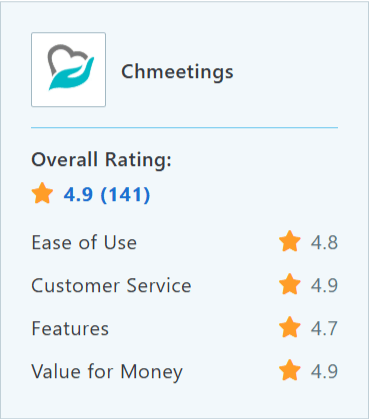
Capterra Ratings

Trusted by over 8,000 churches and dioceses






Hear from the Churches That Made the Move to ChMeetings
Give ChMeetings a Try


ChMeetings vs. Fellowship One FAQ
Why do churches switch from Fellowship One?
Many find Fellowship One complex, outdated, and expensive. Common frustrations include clunky reporting, slow support, and the need to buy add-ons for basic features.
Is ChMeetings easier to use than Fellowship One?
Yes! ChMeetings is built for simplicity and works great even for non-technical users. Staff and volunteers can jump in with minimal training.
Is ChMeetings really all-in-one?
Absolutely. You get member management, events, check-in, giving, communications, accounting, and more all included. No costly add-ons or third-party tools required.
How much does ChMeetings cost compared to Fellowship One?
ChMeetings starts at just $12/month with transparent pricing. Fellowship One starts around $169/month and often charges more for extras and long contracts.
Can we migrate our data from Fellowship One easily?
Yes! We offer free migration for all paid plans and help you move your data securely—so you can get started quickly and confidently.
What support do we get with ChMeetings?
You get fast, friendly support via chat and email, plus a full Help Center. No tiers or hidden fees, every church gets our best.
Is ChMeetings a good fit for a small church size?
Yes! Whether you’re a small church or a large organization, ChMeetings scales with you. Plans are flexible, affordable, and designed for real ministry needs.