Why church content management matters more in 2026

Churches create more content than ever. Sermons, clips, events, announcements, emails, app updates. It adds up fast.
When that content lives in too many tools, things slip through the cracks. People miss updates. Teams duplicate work. Momentum fades.
In 2026, managing content well isn’t about being fancy. It’s about clarity. If members can’t easily find what’s happening or stay connected during the week, engagement drops quietly.
The shift from basic ChMS to content driven church platforms
Older ChMS tools were built to track people and finances. That worked when most ministry happened in person.
Today, content is often the first touchpoint. A sermon video or event reminder reaches someone long before a visit.
Because of that, churches are moving toward platforms that treat content as central, not secondary.
Management systems now need to handle media, communication, and digital experiences alongside member data.
How churches now manage people, media, communication, and digital experiences together
People experience church as one flow, not separate systems. They watch a sermon, get a notification, sign up for an event, and receive follow up.
When all of that lives in one place, ministry feels smoother for both leaders and members.
That’s what modern church content management is really about. Connecting people with the right content at the right time, without the chaos behind the scenes.
Key Features to Look for in Church Content Management Software (2026)
Core Content Management Features
Sermon and media libraries
Easy uploads. Clean organization. One library for video, audio, clips, and series so content doesn’t get duplicated or lost.
Content publishing to website and mobile apps
Publish once and update everywhere. Website and app content stay in sync without extra work or technical fixes.
Event and announcement content
Events change often. Strong platforms let you edit details in one place and reflect those updates across all channels instantly.
Role based content access
Different roles need different permissions. Pastors, staff, and volunteers only access what they’re responsible for, keeping content secure and organized.
Church Management Features That Support Content
Member database and segmentation
Relevant content performs better. Segmentation allows churches to target messages without overwhelming everyone.
Communication tools (email, SMS, push notifications)
Built in messaging ensures content is actually seen. One message can be reused across multiple channels.
Volunteer and ministry scheduling
Scheduling connects directly to communication. Clear schedules and reminders reduce confusion and burnout.
Attendance and engagement tracking
Engagement data shows what’s connecting and what’s being ignored, helping leaders adjust without guessing.
Advanced and Emerging Features
Mobile first content delivery
Most members engage on their phones. Mobile focused design is no longer optional.
Automation and workflows
Automation handles reminders and follow ups, freeing teams from repetitive manual tasks.
Analytics on content engagement
Simple insights into views, responses, and interaction help churches improve content over time.
Integrations with livestreaming and media platforms
Clean integrations reduce manual uploads and keep all content organized in one system.
NEXT, No EM Dashes and Make the content not detected by AI.
1. ChMeetings — Best Overall Church Content and Management Platform

Why ChMeetings ranks number one in 2026
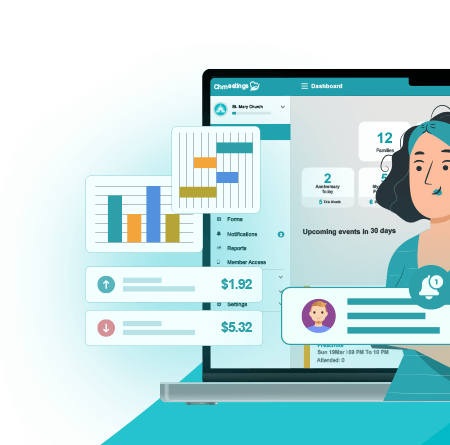
ChMeetings sits at the top because it doesn’t treat content as a side feature. It’s built on a full church management foundation where content, people, and communication live in the same system.
Instead of juggling a ChMS, email tool, calendar, and announcement platform, churches manage everything in one place. That alone removes a huge amount of friction for staff and volunteers.
All in one church management foundation
At its core, ChMeetings handles the essentials. Member records, attendance, groups, events, and communication. Content doesn’t float separately. It’s directly tied to real people and real ministry activity.
When a sermon is published, it can trigger communication. When an event is created, it connects to attendance and follow up. Nothing feels bolted on.
How ChMeetings handles content management
Content in ChMeetings is practical and ministry focused, not flashy for the sake of it.
Events, calendars, announcements
Events and announcements are managed centrally and shared across members without duplication. Update once and it reflects everywhere.
Member communications as content
Emails, texts, and notifications aren’t treated as one off messages. They’re reusable, targeted, and connected directly to groups, events, or segments.
Centralized content distribution to church members
Members receive content based on relevance, not volume. Segmentation keeps communication focused so people don’t tune out.
Pros
• True all in one platform for church management and content
• Content is directly connected to members, groups, and events
• Strong communication tools built in
• Simple learning curve for pastors and volunteers
• Reduces the need for multiple disconnected tools
Cons
• Not designed to replace a full website CMS
• Less emphasis on advanced sermon video hosting compared to media first platforms
Strengths for small to mid sized churches
ChMeetings shines where teams are lean and time is limited. It delivers structure without complexity and power without overwhelm.
Ideal use cases
ChMeetings is ideal for churches that want one unified platform to manage people, events, and communication without stacking software or relying on tech heavy workflows.
2. Subsplash — Best for Sermon, Media, and Digital Content

Why Subsplash stands out in 2026
Subsplash is built for churches where media is the primary ministry channel. Sermons, podcasts, video clips, and mobile app content sit at the center of the platform, not on the edges.
If your church treats digital content as a front door rather than a support tool, Subsplash is designed for that reality.
Media first content management
Subsplash excels at organizing sermon series, speakers, and media assets. Uploading, tagging, and distributing content feels streamlined, especially for churches producing content every week.
Everything is structured to support consistent publishing without relying on custom setups.
Content publishing to apps and websites
One of Subsplash’s biggest strengths is distribution. Media content can be pushed directly to branded church apps and websites with minimal effort.
This makes it easy to maintain a polished digital presence without managing multiple publishing tools.
Pros
• Excellent sermon, video, and podcast management
• Strong mobile app and website publishing
• Polished presentation for digital first churches
• Reliable infrastructure for high media output
Cons
• Limited built in church administration features
• Member management and workflows are basic
• Often requires additional tools for full church operations
Strengths for media heavy churches
Subsplash works best for churches producing a large volume of sermons and digital content and who already have administrative systems in place.
Ideal use cases
Subsplash is ideal for churches that prioritize sermon distribution, online engagement, and mobile app experiences over internal management workflows.
3. Planning Center — Strong Operations with Content Integrations

Why Planning Center remains relevant in 2026
Planning Center continues to be a leader in church operations. It wasn’t built as a content platform, but many churches use it alongside other tools to support content distribution through integrations.
For churches that value structure, scheduling, and internal workflows, Planning Center still plays a central role.
Operations first approach
Planning Center shines in areas like service planning, volunteer scheduling, giving, and people management. Content lives around these workflows rather than at the center.
Sermons, announcements, and media are typically handled through connected platforms rather than natively inside the system.
Managing content through integrations
Churches often pair Planning Center with tools for sermons, websites, or email marketing. Content is created elsewhere, then linked or referenced inside Planning Center workflows.
This setup works well when teams are comfortable managing multiple systems.
Pros
• Industry leading tools for service planning and scheduling
• Strong volunteer and team management features
• Reliable ecosystem with many integrations
• Scales well for larger churches
Cons
• Content management is not centralized
• Requires multiple tools to manage media and communication
• Can feel complex for smaller or volunteer led teams
Strengths for structured church operations
Planning Center is ideal for churches with dedicated staff and clear operational processes who don’t mind using separate platforms for content.
Ideal use cases
Planning Center fits churches that already have content systems in place and need robust operational management more than unified content control.
4. Breeze ChMS — Simple Content and Communication Management

Why Breeze appeals in 2026
Breeze focuses on ease of use. It’s designed for churches that want straightforward tools without a steep learning curve or complex configuration.
Content management in Breeze is light, but practical for basic communication needs.
Simple approach to content
Breeze handles content mainly through announcements, emails, and text messages. There’s no heavy media management, but it covers the essentials many churches rely on week to week.
For teams that want to move fast without technical setup, this simplicity is the appeal.
Communication centered content
Most content in Breeze flows through messaging. Announcements and reminders are easy to create and send to the right people without overthinking structure or workflows.
Pros
• Extremely easy to use
• Quick setup with minimal training
• Strong email and text communication tools
• Affordable for many small churches
Cons
• Limited sermon and media management
• Not built for complex content workflows
• Less flexibility as content needs grow
Strengths for non technical teams
Breeze works well for churches led by volunteers or small staffs who need dependable communication more than advanced content systems.
Ideal use cases
Breeze is ideal for churches that prioritize simplicity, basic announcements, and member communication over deep content management.
5. ChurchTrac — Budget Friendly Content and Admin Tools

Why ChurchTrac remains a contender in 2026
ChurchTrac appeals to churches that need solid basics at a lower cost. It combines core church administration with simple content and communication tools without pushing premium pricing.
For budget conscious churches, that balance still matters.
Practical content management features
Content in ChurchTrac focuses on announcements, events, calendars, and communication. It doesn’t aim to compete with media first platforms, but it covers what many churches actually use week to week.
Sermons and media are supported at a basic level, often alongside external hosting tools.
Event and communication driven content
Events and messaging are where ChurchTrac does most of its content work. Creating calendars, sending updates, and keeping members informed is straightforward and affordable.
Pros
• Lower cost compared to many platforms
• Includes core church admin and communication tools
• Simple event and announcement management
• Good value for small churches
Cons
• Limited advanced content features
• Media management is basic
• Interface can feel dated
Strengths for small churches on a budget
ChurchTrac works best when affordability matters more than cutting edge content features.
Ideal use cases
ChurchTrac is ideal for small churches that need reliable administration and basic content management without stretching the budget.
Church Content Management Software Comparison (High Level)
Content Capabilities Compared
Sermon and media hosting
Subsplash leads with media focused tools. ChMeetings and ChurchTrac support sermons at a practical level, often paired with external hosting. Breeze keeps media minimal. Planning Center relies heavily on integrations.
Website and page content
Subsplash handles digital publishing best. ChMeetings supports announcements and event driven content rather than full website pages. Planning Center and Breeze depend on external website platforms.
Event and calendar publishing
ChMeetings, Planning Center, and ChurchTrac offer strong event and calendar tools. Breeze covers basics. Subsplash supports events mainly as part of app content.
Communication driven content
ChMeetings and Breeze excel in targeted communication. ChurchTrac follows closely. Planning Center handles communication through add ons. Subsplash focuses less on messaging.
Administration and Content Balance
Platforms focused more on administration
Planning Center and ChurchTrac lean heavily toward operations and record keeping.
Platforms focused more on digital content
Subsplash clearly prioritizes media, apps, and digital presentation.
Platforms that balance both
ChMeetings offers the most balanced approach by tying content directly to people, events, and communication in one system.
How to Choose the Right Church Content Management Software
Based on Church Size

Small churches
Smaller churches benefit from simplicity. Platforms like ChMeetings, Breeze, or ChurchTrac reduce complexity and don’t require technical staff to operate.
Mid sized churches
Mid sized churches need flexibility without chaos. ChMeetings offers room to grow while keeping content, communication, and people connected. Planning Center also works well if the church already uses multiple tools.
Large or multi campus churches
Larger churches often need specialized systems. Planning Center handles operations well, while Subsplash supports large scale media distribution when paired with other tools.
Based on Content Needs
Sermon focused ministries
Churches centered on preaching and digital reach benefit from Subsplash or a media first platform paired with a management system.
Community and event driven churches
Churches built around groups, events, and in person engagement need strong calendar and communication tools. ChMeetings fits well here.
Mobile first and online churches
Mobile engagement matters most for these churches. Subsplash excels in app delivery, while ChMeetings supports consistent mobile communication.
Based on Team and Budget
Volunteer led teams
Ease of use matters more than advanced features. Breeze and ChMeetings keep learning curves low.
Staff led churches
Staff teams can manage more complexity. Planning Center works well when roles are clearly defined.
Long term scalability
Churches planning to grow should avoid stacking too many tools early. Platforms that combine management and content reduce future migration pain.
Why ChMeetings Is the Best Choice for 2026
ChMeetings stands out because it simplifies how churches manage both people and content. Instead of forcing teams to stitch together multiple systems, it keeps everything connected in one place.
Unified platform instead of scattered tools
Most churches don’t fail because of lack of effort. They struggle because information lives everywhere. ChMeetings replaces scattered calendars, email tools, and announcement systems with a single source of truth.
When content lives alongside member data, communication becomes clearer and more consistent.
Content management tied directly to people and ministry
Content isn’t just published. It’s delivered with purpose. ChMeetings connects announcements, events, and messages to specific groups, ministries, or attendance patterns.
That connection turns content into follow up, care, and engagement instead of noise.
Ease of adoption for pastors and volunteers
Software only helps if people actually use it. ChMeetings avoids complexity and technical jargon. Volunteers can learn it quickly. Pastors don’t need to become system administrators.
The result is less frustration and more consistency.
Scales as church content and engagement grow
As churches grow, content multiplies. More events. More communication. More people.
ChMeetings scales without forcing a rebuild. Churches can add features and structure over time without abandoning what already works.
Common Mistakes Churches Make with Content Management
Using too many disconnected tools
It starts small. A tool for email. Another for events. Another for sermons. Over time, content gets scattered and no one is sure where the latest version lives.
Disconnected tools create confusion for teams and inconsistent experiences for members. Centralization fixes more problems than most churches expect.
Over focusing on media while neglecting communication content
Sermons matter, but so do reminders, follow ups, and announcements. Churches often invest heavily in video while overlooking the everyday content that keeps people connected during the week.
When communication content is weak, engagement drops even if sermons are strong.
Ignoring analytics and engagement data
Many churches publish content without checking what’s working. Which messages get opened. Which events fill up. Which sermons get replayed.
Basic engagement data helps leaders adjust without guessing. Ignoring it leaves growth to chance.
Choosing software that’s too complex
Powerful software isn’t helpful if no one uses it. Overly complex systems slow teams down and push work onto one or two tech savvy people.
The best platforms support ministry without becoming the ministry.
Future Trends in Church Content Management
AI assisted content organization
As content libraries grow, manual organization breaks down. AI tools are beginning to tag sermons, group content by theme, and surface older messages that are still relevant.
This doesn’t replace human judgment. It saves time and keeps valuable content from being forgotten.
Personalized content delivery to members
One size fits all communication is fading. Churches are moving toward content that adapts to life stage, involvement, and interests.
Personalized delivery helps members feel seen instead of marketed to.
Deeper mobile app integration
Mobile apps are becoming the primary church touchpoint. Content management systems will continue to push more features into the app experience, from sermon engagement to event registration and follow up.
Data driven ministry decisions
Content data will increasingly guide ministry strategy. Not just views or clicks, but patterns of engagement over time.
When used wisely, this data supports better care, better communication, and better stewardship of attention.
Frequently Asked Questions (FAQ)
What is the best church content management software in 2026?
For most churches, ChMeetings stands out as the best option in 2026. It combines church management, communication, and content delivery in one platform, reducing the need for multiple tools while keeping teams organized.
Is church content management different from church management software?
Yes. Church management software focuses on records like members, giving, and attendance. Church content management focuses on sermons, events, announcements, and communication. Modern platforms increasingly combine both.
Can one platform manage sermons, members, and communication?
Some platforms can. ChMeetings is designed to manage people, events, and communication together. Media first platforms like Subsplash handle sermons well but usually require additional tools for full management.
Is ChMeetings a content management system or a ChMS?
ChMeetings is primarily a church management system with strong content and communication capabilities. In practice, it functions as both by connecting content directly to member data and ministry activity.
Do small churches really need content management software?
Small churches benefit the most from simplicity. Content management software helps keep communication clear, reduces missed information, and prevents chaos as the church grows.
Can church content be managed without a website CMS?
Yes. Many churches manage most of their content through apps, email, and messaging. A website CMS is helpful, but not always the central system for content delivery.
What content should churches prioritize managing digitally?
Churches should focus on sermons, events, announcements, and member communication. These touchpoints shape how connected people feel throughout the week.